
MLA Format in 2024: What’s Actually New?
If you’re searching for "MLA format 2024,’ you’re likely wondering if there"s been a major overhaul to the style guidelines. The good news is, you can breathe a little easier. MLA 9th edition remains the current standard as of late 2024. A lot of the online chatter about a 'new' MLA format stems from confusion or a desire for a simple update – something to reassure students that they're on the right track.
However, the MLA Handbook was revised in September 2024, according to Scribbr. Don’t panic! These revisions generally involve clarifications and refinements to existing guidelines, rather than a complete restructuring of the system. Think of it as fine-tuning, not a full rebuild. We’ll focus on the core principles of MLA 9th edition, which will serve you well in most academic contexts.
It's easy to get lost in the noise, especially with so much information available online. Many websites promise the latest "2024 updates," but often these are just repackaged versions of the 9th edition guidelines. At Superior Formatting, we prioritize clarity and accuracy. We aim to provide a reliable and comprehensive guide based on official MLA resources – Purdue OWL and the Modern Language Association itself.
This guide will equip you with the knowledge to confidently format your papers, create accurate citations, and avoid common pitfalls. We’ll cover everything from the MLA format heading to the Works Cited page, ensuring your essays meet the highest standards of academic integrity. Let’s get started with the foundational formatting rules.
The Core Formatting Rules You Need to Know
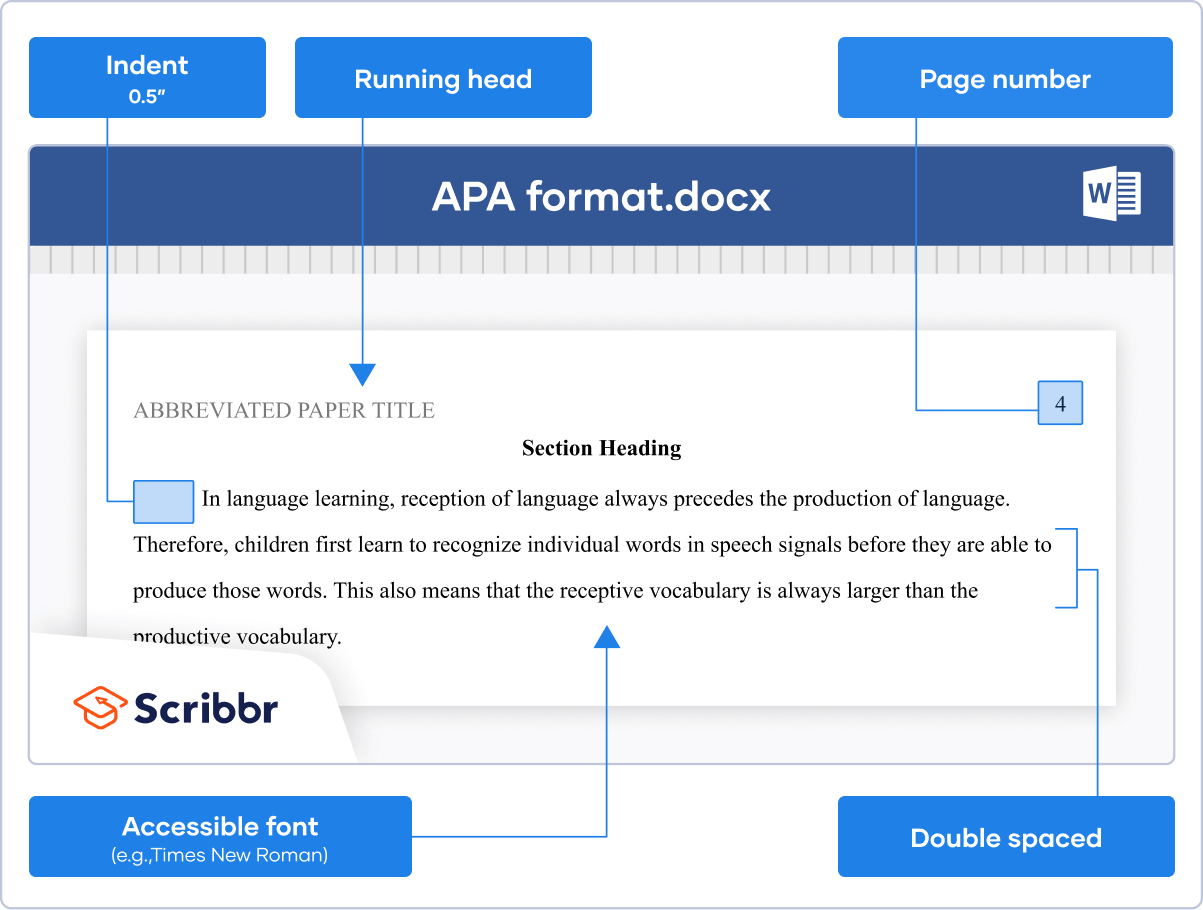
Let’s establish the basic building blocks of MLA formatting. The standard font is Times New Roman, 12-point size. While this is the primary recommendation, most instructors will accept other readable serif typefaces like Garamond or Palatino Linotype. The key is consistency – choose a font and stick with it throughout your entire document.
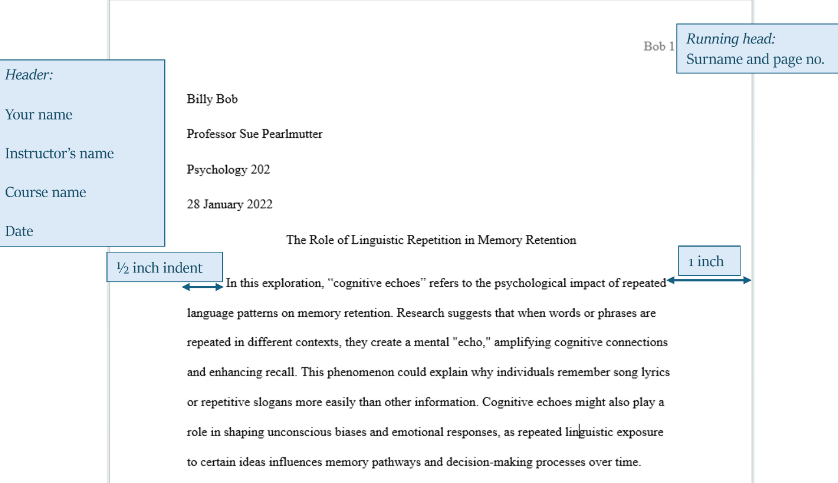
Margins should be set to 1 inch on all sides: top, bottom, left, and right. Double-spacing is crucial; apply it to the entire document, including headings, quotations, and the Works Cited page. This makes the paper easier to read and allows space for instructor feedback. A common mistake is single-spacing the Works Cited page – avoid this!
New paragraphs should be indented ½ inch. Don’t use tabs; use the paragraph formatting options in your word processor to achieve this. This is a simple, yet important detail that contributes to the overall professionalism of your work. Acceptable file formats for submission are typically .doc, .docx, or .pdf – always check your instructor’s preference.
Remember, these aren’t arbitrary rules. They’re designed to create a standardized format that facilitates clear communication and scholarly exchange. Paying attention to these details demonstrates your commitment to academic rigor and respect for your audience.
Crafting the Perfect MLA Heading (2024)
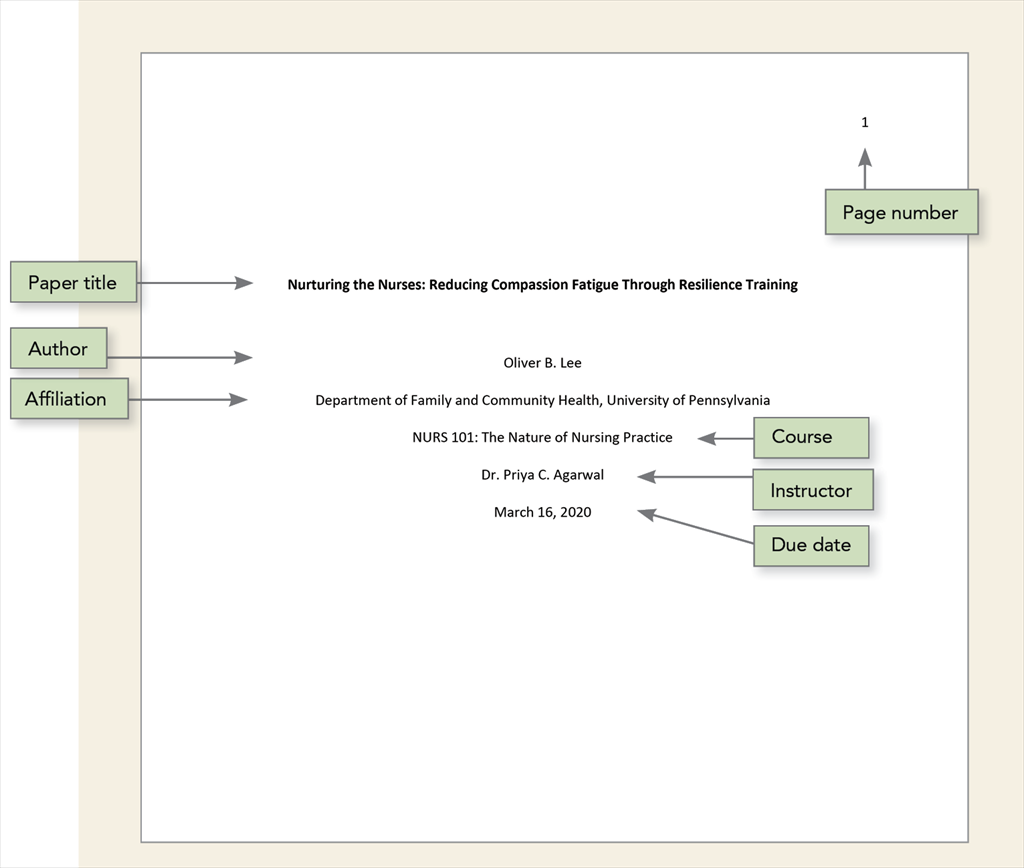
The MLA heading is the first thing your instructor sees, so getting it right is essential. It’s a four-line heading, located in the upper left-hand corner of the first page of your essay. Each line contains specific information, and the order is crucial.
Here’s the breakdown: Line 1 – Your Name. Line 2 – Instructor’s Name. Line 3 – Course Name. Line 4 – Date (in day month year format – 15 January 2024). Note the specific date format; avoid using numerical dates (e.g., 1/15/2024). A frequent error is mixing up the order or using the wrong date format.
Below the four-line heading, centered on the page, is your essay title. Do not bold, italicize, or underline your title, unless specifically requested by your instructor. The entire heading should be double-spaced, just like the rest of your paper. Page numbers should appear in the upper right-hand corner of every page, including the first page.
Many students struggle with the date format. Remember: always use the full month name. Also, double-check that you’ve included all four lines of the heading – omitting information is a common mistake. Taking a moment to carefully construct your heading will make a positive first impression.
- Line 1: Your Name
- Line 2: Instructor’s Name
- Line 3: Course Name
- Line 4: Date (Day Month Year)
In-Text Citations: A Practical Guide
In-text citations are the backbone of MLA style, allowing you to give credit to your sources within the body of your essay. The basic format is (Author’s Last Name Page Number). For example, (Smith 23) indicates a quote or paraphrase from page 23 of a work by Smith. This seems straightforward, but things get more complex with multiple authors or sources.
When a source has two authors, include both last names: (Smith and Jones 45). For sources with three or more authors, use “et al.” after the first author’s name: (Smith et al. 12). If a work has no author, use a shortened version of the title in quotation marks: (“Short Title” 10). It’s important to be precise and consistent with these formats.
Distinguishing between quoting and paraphrasing is also critical. Direct quotes must be enclosed in quotation marks and followed by a page number. Paraphrases–restating someone else's ideas in your own words–still require a citation, but you don't need quotation marks. However, you always need a page number, even when paraphrasing.
Citing a source within a source (also known as an indirect source) requires a bit more finesse. You'll cite the source you actually read, using “qtd. in” (quoted in) to indicate the original source: (Jones qtd. in Smith 56). Block quotes—longer quotations (typically over four lines)—require a different formatting style: they’re indented ½ inch from the left margin, single-spaced, and don’t use quotation marks.
Building Your Works Cited Page: The 9th Edition Way
The Works Cited page is a comprehensive list of all the sources you used in your essay. It appears at the end of your paper, on a new page. The entire page should be double-spaced, and entries should be alphabetized by the author’s last name. If a source has no author, alphabetize by the title (ignoring articles like 'A,' 'An,' and 'The').
Each entry follows a specific format, which varies depending on the source type. For a book, the format is: Author’s Last Name, First Name. Title of Book. Publisher, Year. For a journal article, it’s: Author’s Last Name, First Name. “Title of Article.” Title of Journal, Volume, Issue, Date, Pages. For a website, it's: Author’s Last Name, First Name (if available). “Title of Web Page.” Name of Website, Date of Publication, URL.
Accuracy is paramount on the Works Cited page. Double-check all details – author names, titles, dates, URLs – to ensure they match the original source. A hanging indent is used for each entry: the first line is flush left, and subsequent lines are indented ½ inch. This makes it easier to scan the page and identify each source.
What if a source is missing information, like a publication date? MLA allows for some flexibility. You can use “n.d.” (no date) if the publication date is unavailable. However, always strive to find as much information as possible. A well-crafted Works Cited page demonstrates your attention to detail and commitment to academic honesty. I’ve found that using a citation manager like Zotero or Mendeley can be a huge time-saver.
Navigating Digital Sources and URLs
Citing online sources can be tricky, as websites are often dynamic and subject to change. When citing a website, include the author’s name (if available), the title of the web page, the name of the website, the date of publication (if available), and the URL. It's generally best to use a stable URL or permalink whenever possible.
DOIs (Digital Object Identifiers) are preferred over URLs for journal articles and other scholarly sources. A DOI is a unique and persistent identifier that ensures the source can be located even if the URL changes. If a source has a DOI, include it in the citation instead of the URL. Access dates were previously required but are now generally omitted unless the source is likely to change.
Citing sources found through databases requires careful attention. You’ll generally cite the original source, not the database itself. However, you may need to include the database name in the citation if it’s relevant. Be aware that websites can disappear or change their content, so it’s always a good idea to archive a copy of the page if possible.
I’m not sure about the long-term stability of some online sources, which is why it’s crucial to evaluate the credibility of the website before using it in your research. Look for reputable organizations, established authors, and evidence of peer review. When in doubt, consult your instructor or a librarian.
Common MLA Formatting Mistakes (and How to Avoid Them)
Let’s tackle some common MLA formatting pitfalls. Incorrect heading format is a frequent issue. Remember the four lines, the specific order, and the correct date format (day month year). Another common error is missing page numbers. Every page, including the first, should have a page number in the upper right-hand corner.
Incorrect citation style is a big one. Pay close attention to the punctuation, capitalization, and order of elements in both in-text citations and Works Cited entries. Inconsistent formatting can also detract from your paper. Choose a font and stick with it, double-space throughout, and use consistent indentation.
Here are some frequently asked questions:
Q: Do I need to italicize my essay title on the heading? A: No, do not italicize, bold, or underline your essay title. It should be centered below the heading in standard font.
Q: What if I can’t find the author of a website? A: Use the title of the web page in place of the author’s name.
Q: How do I cite a source with no page numbers? A: If the source doesn't have page numbers, you can omit the page number from the in-text citation.
Resources for Mastering MLA 9th Edition
Ready to become an MLA formatting expert? Several excellent resources are available to help you succeed. The Purdue OWL (Online Writing Lab) is an invaluable resource, offering comprehensive guidelines and examples: https://owl.purdue.edu/owl/research_and_citation/mla_style/mla_formatting_and_style_guide/mla_formatting_and_style_guide.html.
The official MLA website (https://www.mla.org/) provides access to the MLA Handbook and other valuable resources. Citation management tools like Zotero (https://www.zotero.org/) and Mendeley (https://www.mendeley.com/) can help you organize your sources and generate citations automatically.
Remember, while these resources are helpful, it’s always a good idea to consult your instructor for specific requirements. Different instructors may have different preferences, so it’s important to clarify their expectations before submitting your work.
At Superior Formatting, we’re committed to providing you with the tools and knowledge you need to excel in your academic writing. With practice and attention to detail, you can master MLA formatting and produce polished, professional essays.
- Purdue OWL: https://owl.purdue.edu/owl/research_and_citation/mla_style/mla_formatting_and_style_guide/mla_formatting_and_style_guide.html
- MLA Website: https://www.mla.org/
- Zotero: https://www.zotero.org/
- Mendeley: https://www.mendeley.com/
MLA Resources
- Purdue OWL MLA Formatting and Style Guide - A comprehensive and frequently updated resource covering all aspects of MLA format, from in-text citations to Works Cited entries. Visit Purdue OWL
- The MLA Handbook (9th Edition) - The official source for MLA guidelines. While access often requires purchase, many libraries offer copies. MLA Style Center
- EasyBib MLA Citation Generator - A popular tool for automatically generating MLA citations. *Always double-check the generated citations for accuracy.* EasyBib
- Cite This For Me MLA Generator - Another citation generator that can assist in creating Works Cited entries. Remember to review and verify all generated citations. Cite This For Me
- BibMe MLA Citation Builder - Provides tools to create and manage MLA citations, including a plagiarism checker. Verification of results is essential. BibMe
- MLA Style Center FAQ - Addresses frequently asked questions about MLA style, offering clarification on specific formatting issues. MLA Style Center FAQ
No comments yet. Be the first to share your thoughts!