

The 2026 APA title page guide
APA 7th edition guidelines are the standard for 2026. While the core rules are stable, the title page requirements differ depending on whether you are submitting a class assignment or a manuscript for publication. A clean title page is about more than just following rules; it makes your work readable and organized from the first page.
Below, you’ll find examples illustrating these differences. The student title page is typically simpler, focusing on course information, while the professional version includes elements like an author note and affiliations. Both, however, share a commitment to clarity and conciseness. I believe focusing on these visual distinctions early on will save you time and frustration later.
Pay close attention to spacing, font, and alignment – these seemingly small details contribute significantly to a polished, professional appearance. A well-formatted title page isn’t just about following rules; it’s about presenting your work in the best possible light. The details matter, and a little extra effort upfront can make a big difference in how your work is perceived.
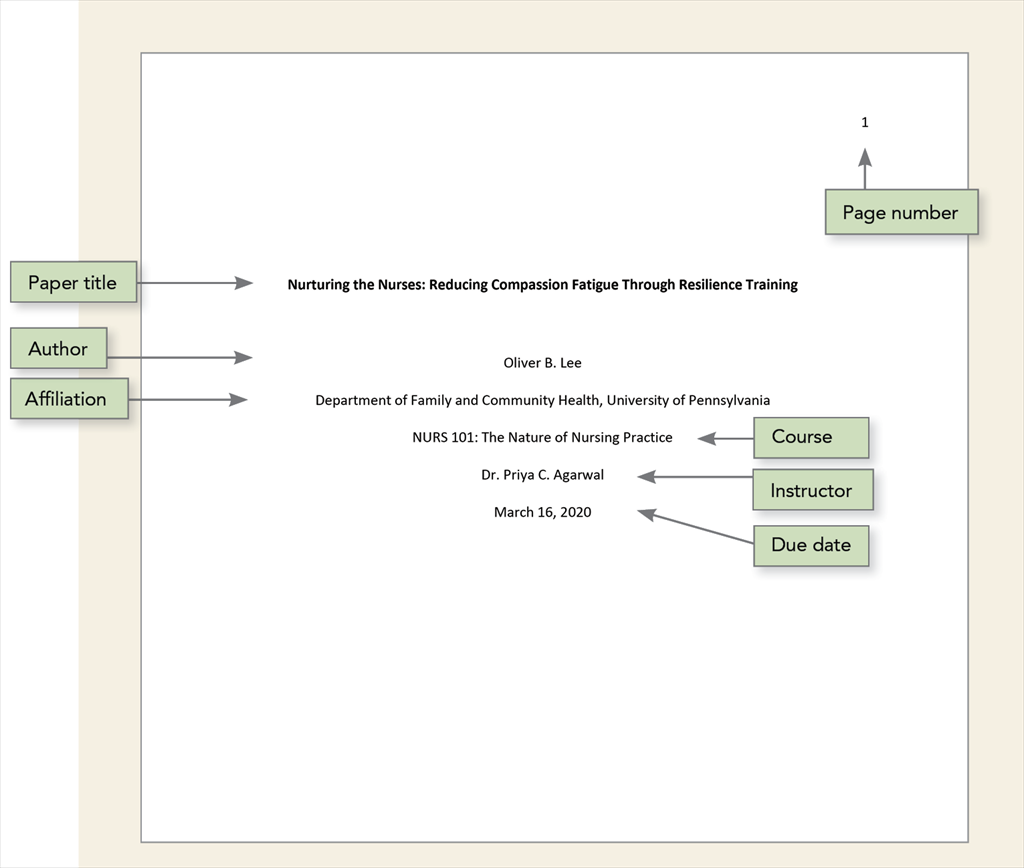
Student paper title page elements
The student paper title page is designed to clearly identify your work within the context of a course. It begins with the page number in the upper right-hand corner. Below that, centered and bolded, is the full title of your paper. This title should accurately reflect the content of your work, but it doesn’t need to be overly complex.
Following the title, include your name, the name of the institution you’re attending, the course name and number (e.g., Psychology 101), your instructor’s name, and finally the due date of the assignment. All text should be double-spaced, consistent with the rest of your paper. The date format is typically month, day, year (e.g., January 1, 2024).
A common mistake students make is using incorrect date formatting or omitting essential information like the course number. Another frequent error is failing to double-space consistently throughout the page. Always double-check your work against the APA guidelines provided by your institution or Purdue OWL. Remember, consistency is key – a unified look strengthens your presentation.
It’s also worth noting that while some instructors may have specific preferences, they should align with the core principles of APA 7th edition. Don’t hesitate to ask for clarification if you’re unsure about any requirements. Clear communication with your instructor is always a good practice.
Professional paper requirements
The professional paper title page expands on the student version, adding elements relevant to publication or formal research. Like the student page, it includes the page number and title. However, instead of course information, it features an author note and affiliations. The author note provides a space for acknowledging funding sources, disclosing conflicts of interest, and providing contact information.
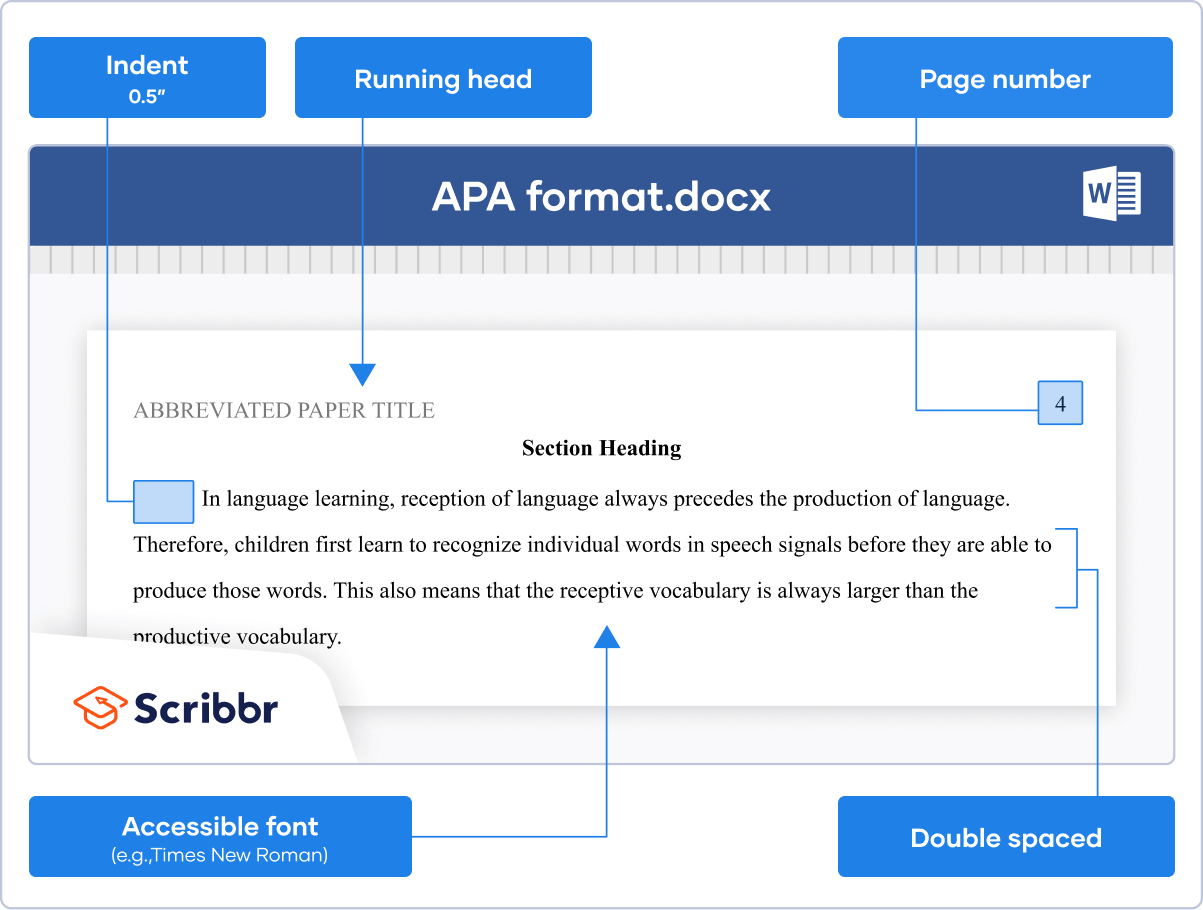
The running head is simpler now. It is the paper title in all caps, capped at 50 characters, and left-aligned in the header. Student papers do not require a running head unless an instructor specifically asks for one; it is primarily a requirement for professional manuscripts.
A crucial addition for professional papers is the inclusion of ORCID iDs (Open Researcher and Contributor ID). These unique identifiers help distinguish you from other researchers with similar names and are increasingly required by journals and funding agencies. These are typically included in the author note. You can obtain an ORCID iD at
Listing affiliations – the institutions where the research was conducted – is also essential. These are listed below the author’s name. The professional title page demonstrates a commitment to transparency and accountability, reflecting the standards of academic publishing.
- Author Note: Acknowledges funding, disclosures, contact information, and ORCID iDs.
- Affiliations: Lists the institutions where the research was conducted.
- Running Head: Title in all caps (max 50 characters), left-aligned in the header.
Essential Resources for Mastering APA 7th Edition Title Pages

Official guide from the American Psychological Association · Covers all aspects of APA style, including title page formatting · Includes examples for student and professional papers
This is the definitive source for APA style, offering detailed instructions and examples essential for accurate title page creation in both academic and professional contexts.
Official guide from the American Psychological Association · Covers all aspects of APA style, including title page formatting · Includes examples for student and professional papers
This is the definitive source for APA style, offering detailed instructions and examples essential for accurate title page creation in both academic and professional contexts.

Laminated, portable reference guide · Summarizes key APA 7th Edition guidelines · Focuses on essential formatting elements, including title pages
This quick-reference guide provides a concise overview of APA 7th Edition title page requirements, making it ideal for quick checks and on-the-go assistance.
Laminated, portable reference guide · Summarizes key APA 7th Edition guidelines · Focuses on essential formatting elements, including title pages
This quick-reference guide provides a concise overview of APA 7th Edition title page requirements, making it ideal for quick checks and on-the-go assistance.
As an Amazon Associate I earn from qualifying purchases. Prices may vary.
Page Numbering and Running Head Explained
Correct page numbering is straightforward: insert the page number in the upper right-hand corner of every page, including the title page. Most word processors have a header function that makes this easy to automate. The running head, however, can be a bit more challenging. As mentioned before, it’s the shortened version of your title, limited to 50 characters, in all capital letters, and left-aligned.
In Microsoft Word, double-click the header, then select Insert > Page Number > Top of Page > Plain Number 3. For professional papers, type your shortened title in all caps. Note that the label 'Running head:' is no longer used in the 7th edition; just use the title itself.
It's important to note that the running head requirements can vary slightly depending on whether you’re preparing a student or professional paper. Always consult the latest APA guidelines for clarification. A step-by-step guide illustrating these processes can be found on the Purdue OWL website.
Many people struggle with the header/footer function in word processors. Don’t be afraid to search for tutorials online – there are plenty of resources available to help you master these features. Taking the time to learn these skills will save you frustration in the long run.
- Double-click in the header area.
- Insert page number in the top right corner.
- Type the shortened title in all caps (professional papers only).
- Ensure correct alignment and capitalization.
Title length and capitalization
The ideal title length is concise but informative – aim for 12 words or fewer. A good title accurately reflects the main topic of your paper without being overly verbose. Avoid jargon and unnecessary words that might confuse readers. The goal is to quickly convey the essence of your research.
APA style follows specific rules for capitalization. Capitalize only the first word of the title, the first word after a colon or em dash, and proper nouns. For example, "The Impact of Social Media on Adolescent Development’ is correctly formatted. ‘The impact of social media on adolescent development" is incorrect.
Consider these examples: "Cognitive Behavioral Therapy for Anxiety Disorders’ (good) versus ‘A Comprehensive Examination of the Effects of Cognitive Behavioral Therapy on the Treatment of Anxiety Disorders" (too long). Titles should be clear and direct, avoiding ambiguity.
Resources like the APA Style website and the Purdue OWL offer extensive guidance on writing effective titles. I recommend reviewing these resources to ensure your title meets the required standards. A well-crafted title is the first step towards attracting readers and conveying the importance of your work.
Author Note: Purpose and Content
The author note, included in professional papers, serves to provide additional information about the author(s) and the research. It’s a space to acknowledge funding sources, disclose any conflicts of interest, and provide contact information for correspondence. This transparency is crucial for maintaining academic integrity.
Typically, the author note includes a statement of funding support, if applicable, and any disclosures of potential conflicts of interest. It also includes the author’s contact information, such as their email address and institutional affiliation. Increasingly, researchers are including their ORCID iDs in the author note.
I’m curious about the current best practices for formatting ORCID iDs within the author note – some journals have specific requirements. It’s always best to consult the author guidelines of the target journal. The author note is a relatively small section, but it plays a significant role in establishing credibility.
The information provided in the author note should be concise and accurate. It’s a chance to demonstrate professionalism and attention to detail. Remember to double-check all information before submitting your paper.
Common Mistakes to Avoid
Before submitting your paper, take a moment to review it for common formatting errors. Incorrect date formatting is a frequent issue – ensure you’re using the correct month, day, year format. Missing elements, like the page number or running head, are also common mistakes.
Improper capitalization in the title can detract from the overall presentation. Incorrect spacing, particularly double-spacing throughout the document, is another area to watch out for. Always use a consistent font and font size (typically Times New Roman, 12pt).
Consider this a final check before submission. Read the APA guidelines carefully, and compare your title page to the examples provided. A fresh pair of eyes can also be helpful – ask a friend or colleague to review your work.
To test your knowledge, consider taking a short quiz on APA formatting. Several online resources offer practice quizzes to help you identify areas where you might need to improve. Attention to detail is paramount – a well-formatted title page demonstrates professionalism and respect for the academic process.
- Incorrect date formatting
- Missing page number or running head
- Improper capitalization
- Inconsistent spacing
- Incorrect font or font size
APA 7th Edition Title Page Mastery: 2026 Updates
The American Psychological Association (APA) style guide is frequently updated. This quiz will test your knowledge of the latest APA 7th edition title page requirements, specifically focusing on the distinctions between student and professional papers as of 2026. Accurate formatting is crucial for academic and professional success – let's see how well you understand these guidelines!

No comments yet. Be the first to share your thoughts!