
MLA 9th: Updates for 2026
The Modern Language Association (MLA) updates its style guidelines periodically to reflect changes in academic research and publishing. The 9th edition, with further refinements expected, introduces subtle but important changes students should know. These adjustments clarify existing rules and address challenges from diverse source materials.
The growth of digital scholarship drives these changes. We now cite more online sources like podcasts, streaming videos, and social media posts, and MLA provides guidance for accurate citation. The updates aim to make the process less ambiguous, especially for sources that don’t fit traditional categories. Clarity and consistency remain the goals.
The focus for 2026 is on reinforcing existing guidelines and providing specific examples. Expect continued emphasis on DOIs (Digital Object Identifiers) and stable URLs. The Purdue OWL offers practical examples for quick reference. Keeping up with these changes is part of academic integrity.
The MLA Heading: A Detailed Look
The MLA heading is the first thing your instructor sees, so getting it right is essential. It’s a common area for errors, even among experienced students. The information must appear in a specific order, double-spaced, and aligned to the left margin: your name, the instructor’s name, the course name, and the date—all on separate lines.
Your name should be your full name, as it appears on official records. The instructor’s name should follow their preferred title (Dr., Professor, Ms., etc.). The course name includes both the course number and section number (e.g., English 101-02). The date should be formatted as Day Month Year (e.g., 26 October 2024). No commas or periods are needed after any of these elements, a departure from older MLA editions that sometimes included commas.
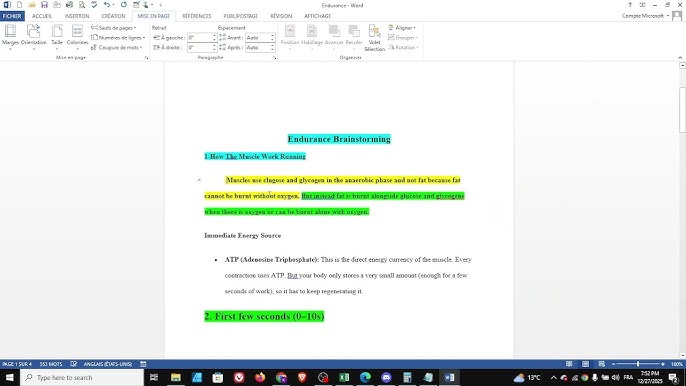
Creating the heading in Microsoft Word is straightforward. Type each line of information and press Enter. Then, select all four lines, right-click, and choose "Paragraph.’ In the ‘Spacing’ section, select ‘Double." A frequent mistake is forgetting to double-space. Another is misformatting the date. A quick check against these guidelines can save you points.
Older MLA editions sometimes required more information in the heading, such as the assignment title. The 9th edition streamlines this process, focusing on essential elements. Double-check with your instructor for specific preferences, but the standard format outlined above should generally suffice. Consistency is key.
Works Cited: New Source Types
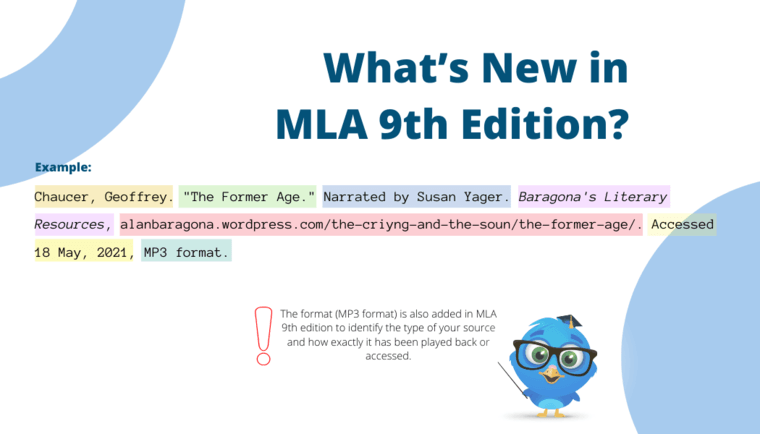
Citing sources accurately is central to MLA format. Recent updates provide guidance for newer, often digital, source types. Podcasts, streaming videos, and social media posts present unique challenges because they don’t always fit traditional citation models. The Purdue OWL offers detailed examples.
For podcasts, distinguish between citing a podcast series and a specific episode. For a series, include the podcast title, host(s), and publisher. For an episode, add the episode title and publication date. Example: Stuff You Should Know. Hosted by Josh Clark and Chuck Bryant, iHeartRadio, 2010-present. For an episode: “How the Electoral College Works.” Stuff You Should Know, iHeartRadio, 14 Oct. 2020.
Streaming video platforms like Netflix and Hulu require specific citation formats. Include the title of the show or movie, the episode title (if applicable), the platform name, and the publication date. Example: The Crown. Season 4, episode 1, “Gold.” Netflix, 15 Nov. 2020. The platform name is italicized, differing from citing a DVD or Blu-ray.
Social media posts are trickier. Include the author’s username, the date of the post, and the platform (e.g., Twitter, Facebook, Instagram). A full URL is essential. Example: @LinManuelMiranda. “Just finished writing a new song for the show!” Twitter, 12 Jan. 2024. Online forums require similar information: author's username, post title, forum name, and URL.
Be as specific as possible. Provide enough information for your reader to easily locate the source. Consult the Purdue OWL or the MLA Handbook when in doubt. Understand the underlying principles of citation, don't just copy and paste.
In-Text Citations: Parenthetical & Narrative
In-text citations acknowledge your sources within the essay body. MLA uses a parenthetical system, including brief citations in parentheses after borrowed information. There are two main types: parenthetical and narrative. Both serve the same purpose but differ in integration into your writing.
A parenthetical citation typically includes the author’s last name and page number (if available), e.g., (Smith 23). If the author’s name is in the sentence, include only the page number: Smith argues that “..” (23). For two authors, include both last names: (Smith and Jones 45). For three or more authors, use “et al.” after the first author’s name: (Smith et al. 50).
Narrative citations incorporate the author’s name into the sentence, e.g., Smith argues that “..” (23). This approach can make writing flow more smoothly, but avoid awkward phrasing. The page number is still required, even when the author’s name is part of the sentence. Vary these to avoid monotony.
For sources without page numbers, common with online sources, omit the page number. If the source has section headings or paragraph numbers, use those instead, e.g., (Smith, para. 5). Block quotes require different handling, covered in the next section. Requirements for block quotes in the 2026 updates are unconfirmed, so verification is advised.
- Use the author's last name and page number: (Smith 23)
- If the author is mentioned, just use the page number: Smith argues (23).
- For two authors: (Smith and Jones 45)
- For three or more: (Smith et al. 50)
Formatting Long Quotations
Quoting more than four lines of prose or three lines of verse requires formatting as a block quote. Indent the entire quotation one inch from the left margin, double-space it, and omit quotation marks. Introduce the block quote with a colon, and place the parenthetical citation after the final punctuation mark.
Here’s an example: > The concept of the uncanny valley suggests that as robots become more human-like, our emotional response to them becomes increasingly negative. This is because we are able to detect subtle imperfections that remind us of death and decay. > (Freud 125).
Notice the indentation, the double-spacing, and the lack of quotation marks. The colon introduces the quote, and the citation comes after the period. When quoting from an online source, be sure to include the URL in your Works Cited entry. It’s also helpful to indicate the paragraph number if the source doesn’t have page numbers.
Carefully review the formatting requirements for block quotes. Incorrect indentation or missing citations are common errors. Remember, the goal is to present the quotation clearly and accurately, while still acknowledging the original author.
Digital Sources & DOIs
In the digital age, DOIs (Digital Object Identifiers) are becoming increasingly important. A DOI is a unique, persistent identifier for an online source. Think of it as a permanent web address that won’t change, even if the URL does. When available, always include the DOI in your Works Cited entry. It makes it much easier for your reader to locate the source.
You can usually find the DOI on the source’s webpage, often near the title or abstract. Many databases will also display the DOI prominently. The format for a DOI in a Works Cited entry is: number]. For example: This is preferable to using a URL.
What if a DOI isn’t available? In that case, use a stable URL—a permanent link that is unlikely to change. Avoid using shortened URLs or links that require a login. The URL should be clearly visible and accessible. Always double-check the link to make sure it works.
Prioritizing DOIs and stable URLs demonstrates your commitment to accuracy and reliability. It also makes your research more reproducible, which is important for academic credibility. While URLs can work, DOIs are the gold standard.
Common MLA Errors to Avoid
Let’s face it: everyone makes mistakes. But knowing the most common pitfalls can help you avoid them. One frequent error is an incorrectly formatted MLA heading. Double-check the order of information and the spacing. Another common mistake is missing Works Cited entries. Make sure you cite every source you use, even if you only borrow a single idea.
Inconsistent citation styles are also a problem. Choose a consistent approach and stick with it throughout your paper. Improper use of punctuation—especially commas and quotation marks—is another area where students often stumble. Pay close attention to the details.
Here are a few more watch-outs: confusing parenthetical and narrative citations, failing to include page numbers when available, using unreliable sources, and neglecting to proofread your work. These errors may seem minor, but they can detract from the overall quality of your essay.
Don’t be afraid to ask for help. Your instructor, a writing center tutor, or a librarian can all provide valuable feedback. Taking the time to review your work carefully will pay off in the long run.
- Incorrectly formatted MLA heading
- Missing Works Cited entries
- Inconsistent citation styles
- Improper punctuation
Resources for Mastering MLA 9th
Fortunately, you’re not alone in navigating the complexities of MLA format. Several excellent resources are available to help you succeed. The Purdue OWL (Online Writing Lab) is arguably the most comprehensive and reliable source. It provides detailed explanations, examples, and exercises.
The official MLA Handbook is the ultimate authority, but it can be expensive. Many libraries have copies available for reference. Other helpful websites include EasyBib and Citation Machine, but be sure to double-check their accuracy against the Purdue OWL. These tools can be helpful, but they’re not always perfect.
Superior Formatting offers guides to help with everything from MLA format heading to how to cite a book title in an essay. Remember that understanding the principles of MLA style is more important than simply memorizing rules. Focus on clarity, consistency, and accuracy, and you’ll be well on your way to writing successful academic papers.
No comments yet. Be the first to share your thoughts!