

Set up your document settings
Before you begin typing the specific content of your APA title page, you must configure the underlying document properties. Proper formatting ensures your synthesis essay meets academic standards from the very first line. The American Psychological Association requires a clean, uniform appearance across the entire paper.

Set your document margins to exactly one inch on all sides: top, bottom, left, and right. This standard spacing provides adequate room for binding and ensures the text does not crowd the edges of the page. Check your word processor’s page setup menu to confirm these settings are applied to the whole document.
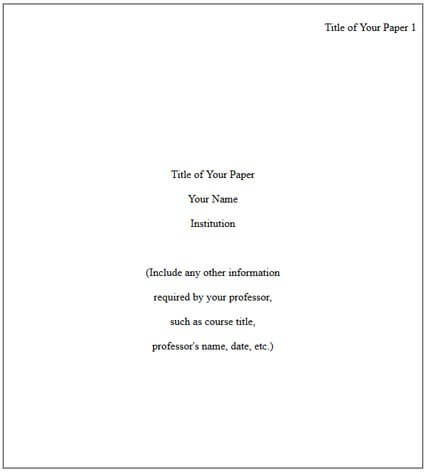
Choose a legible, standard font that APA Style accepts. Times New Roman in 12-point size is the most common choice. Alternatives include 11-point Calibri, 11-point Arial, or 10-point Lucida Sans Unicode. Consistency is critical; do not change fonts between the title page and the rest of the essay.
Set your line spacing to double throughout the entire document. This includes the title, author name, department, university, course information, instructor name, and due date. Double spacing improves readability and allows space for instructor feedback. Ensure there is no extra spacing added between paragraphs.
Set the paragraph alignment to center. All text on the APA title page should be centered horizontally. This includes the paper title, your name, and all affiliation details. Do not use left alignment or justification for the title page content.

These foundational settings create the framework for the title page. Once these properties are saved, you can proceed to add the specific text elements like the paper title and author information.
Add the running head and page number
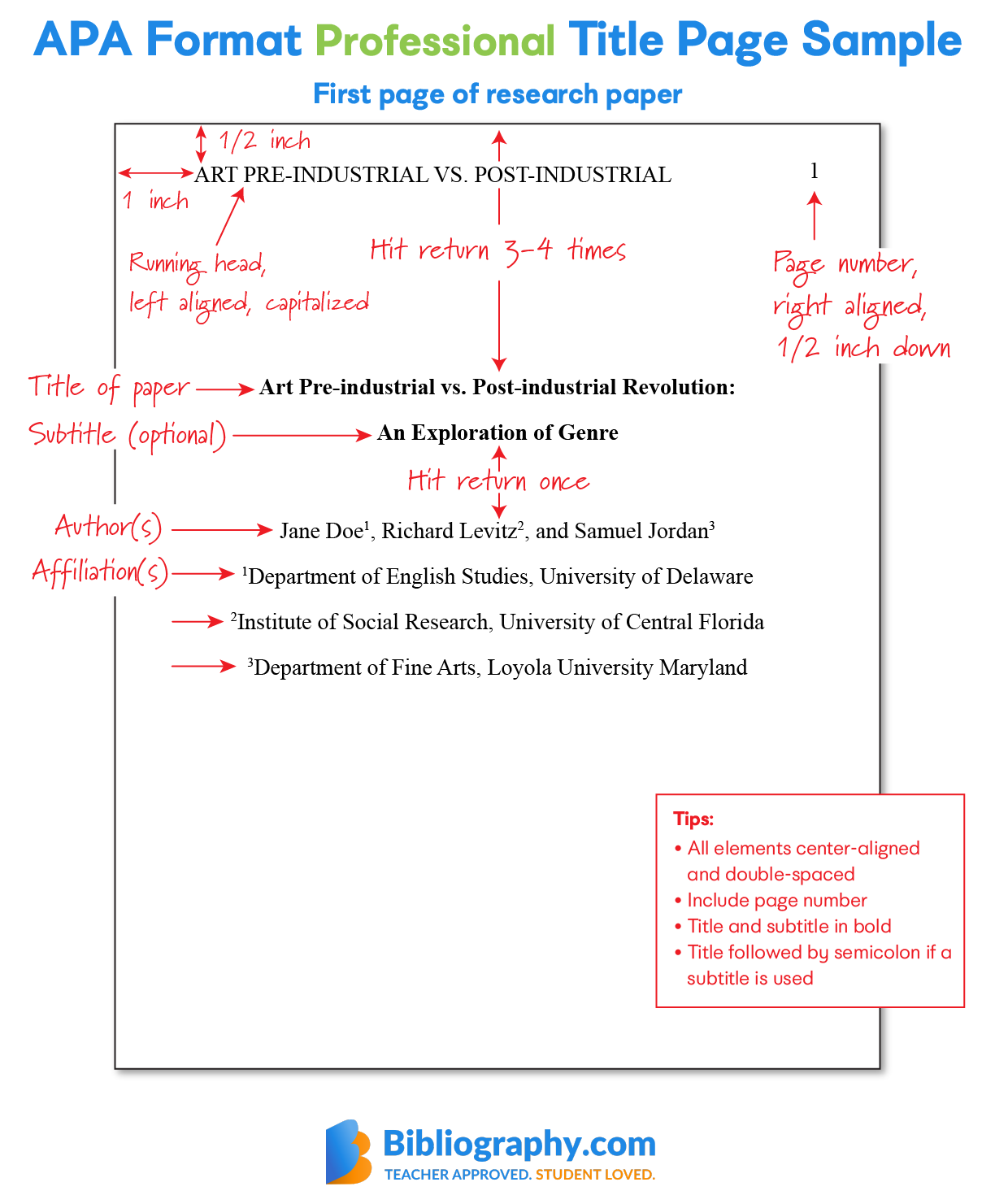
The header of your APA format title page serves as a navigational anchor for readers and graders. It consists of two distinct elements: the running head and the page number. While the running head appears on every page, the title page itself is designated as page 1. This section applies to professional papers, such as those submitted for publication or advanced coursework. Student papers often have different requirements, which we will address shortly.
Step 1: Set the page number
Every page in your manuscript, including the title page, must display a page number. Place the number in the top right corner of the header, flush with the right margin. The standard APA format title page uses 1-inch margins on all sides, so the number should sit within that top margin space. Use the "1" key to start your pagination. Do not use the word "page" or add a period after the number. Simply the numeral "1" is correct.
Step 2: Create the running head
For professional papers, the running head is an abbreviated version of your full paper title. It must not exceed 50 characters, including spaces and punctuation. This abbreviation helps readers identify the document if pages become separated. To create it, look at your full title and select the most significant words. Remove articles (a, an, the), prepositions, and conjunctions unless they are central to the meaning. Keep the abbreviation in all capital letters.
Step 3: Position the running head
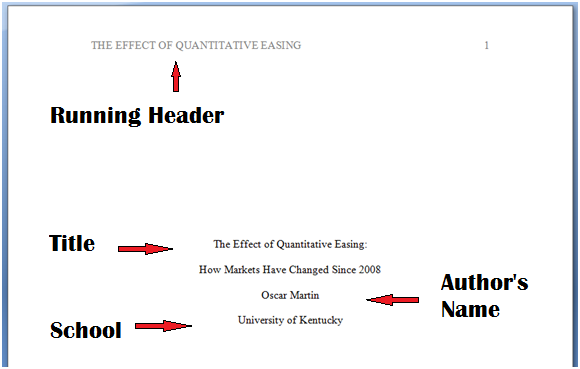
Place the running head in the top left corner of the header, flush with the left margin. It should appear on the same line as the page number. The text must be in all caps. For example, if your title is "The Impact of Sleep on Academic Performance," your running head might be "IMPACT OF SLEEP ON ACADEMIC." Ensure there is no extra spacing between the running head and the page number other than the standard tab or space that aligns them to opposite margins.
Student paper exception
If you are writing a student paper, you likely do not need a running head. The current APA 7th edition guidelines state that student papers generally require only the page number in the header. Check your instructor’s preferences or your course syllabus to confirm. If a running head is required, follow the same steps above. Otherwise, leave the left side of the header blank and keep only the page number in the top right corner.

Place the page number in the top right corner, flush with the right margin. Use the numeral "1" for the title page. Do not add the word "page" or a period.
Create a running head that is 50 characters or less. Use all capital letters. Remove filler words like "the" or "and" to keep it concise.
Position the running head in the top left corner, flush with the left margin. It should appear on the same line as the page number on the right.
Enter the paper title and author details
The APA title page for a synthesis essay follows a strict vertical hierarchy. You will enter six specific elements, each on its own line, centered from the left margin. The spacing between these lines is uniform—typically one double space (one blank line) between each entry.
Start with the paper title. Place it three to four lines down from the top of the page. Type the title in bold font and use title case, capitalizing major words. Keep the title concise and descriptive of your synthesis topic. Center the text horizontally.
Next, enter your full name on the following line. Do not include degrees (like Ph.D. or M.A.) unless specifically requested by your instructor. Center the name just as you did the title.
On the third line, type your institutional affiliation. For a student paper, this is usually the name of your university or college. Ensure the spelling matches official institutional records.
The fourth line contains the course information. Include the course number and the full course name, separated by a colon. For example: "PSY 101: Introduction to Psychology."
The fifth line is for the instructor's name. Type the full name as they prefer it to be addressed in an academic context. You may include their title (Professor, Dr.) if appropriate.
Finally, enter the due date on the sixth line. Use the format Month Day, Year (e.g., October 24, 2024). Avoid abbreviations for the month in formal APA formatting.
Type the paper title three to four lines down from the top. Center the text, use bold font, and apply title case capitalization. This is the first and most prominent element on the page.
On the next line, center your full name. Do not include academic degrees or titles unless required. This identifies the author of the synthesis essay.
Center your institutional affiliation on the third line. For students, this is typically the university name. This establishes the context of the work.
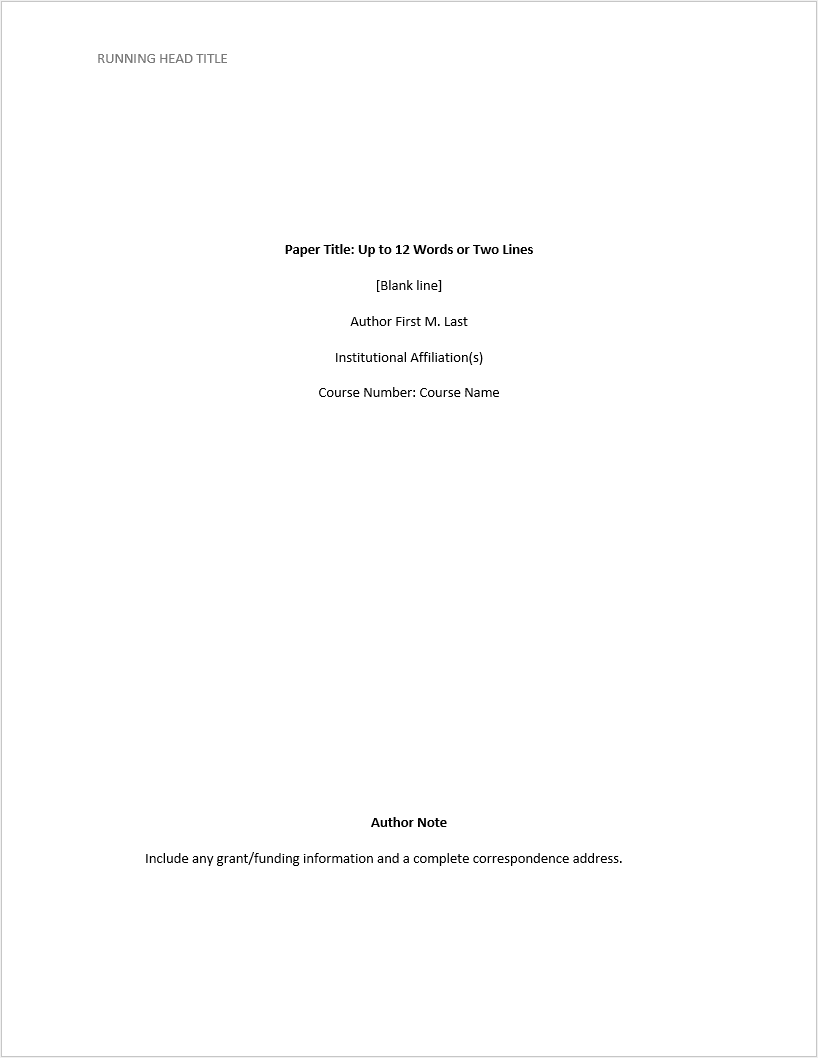
On the fourth line, center the course number and course name. Use a colon to separate them. This helps the instructor identify the specific class.
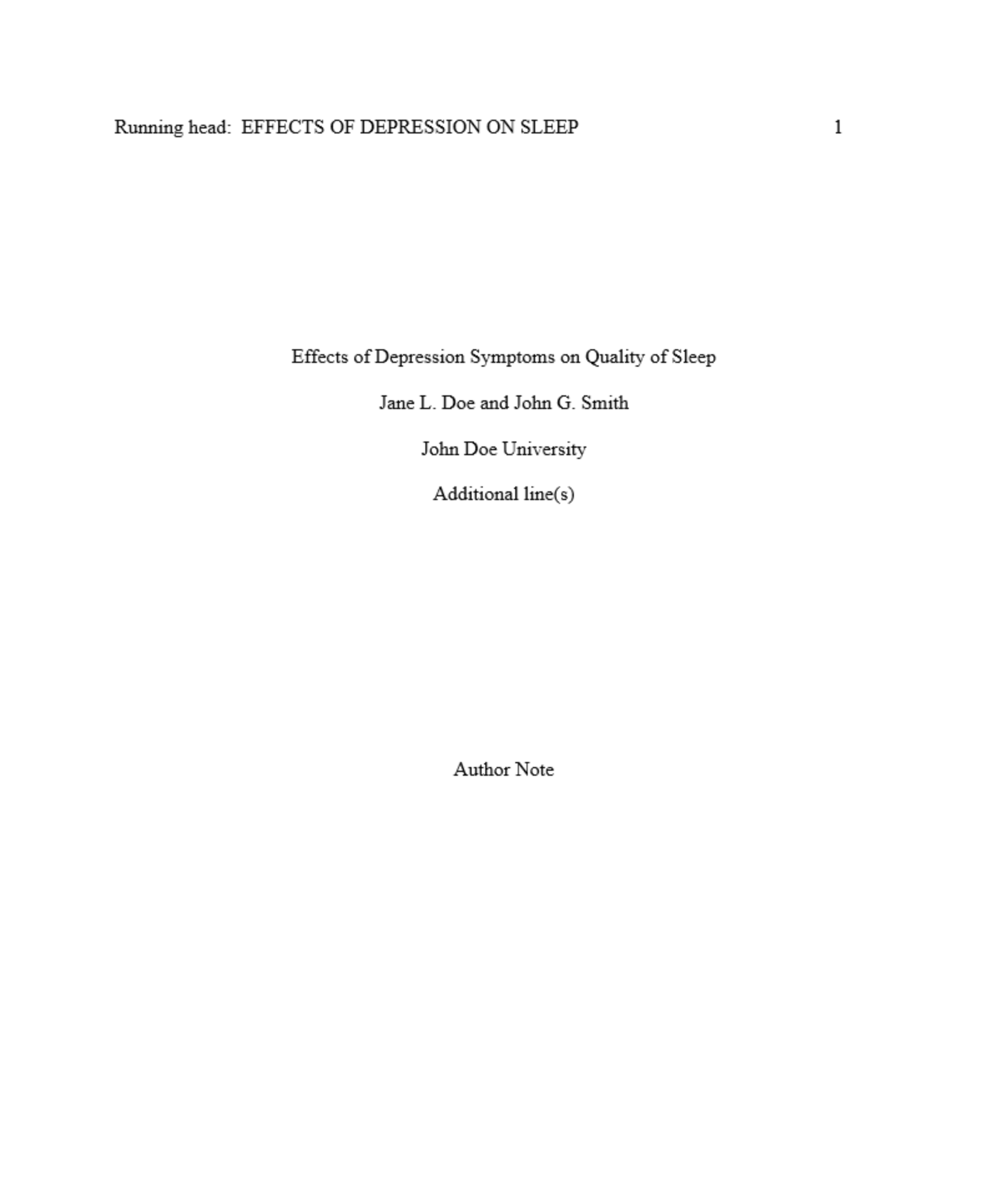
Center the instructor's full name on the fifth line. Use their preferred academic title if known. This ensures the paper is routed to the correct evaluator.
%2520(2).webp)
On the final line, center the due date in Month Day, Year format. This completes the standard APA title page header requirements.
Check common formatting mistakes
Even small deviations can cause your APA format title page to be rejected or marked down. The difference between a polished academic document and a sloppy draft often comes down to precise adherence to spacing, capitalization, and element placement. Use the following steps to catch and correct the most frequent errors before you submit your synthesis essay.

The paper title must be in title case and bolded. Many students forget the bolding or use sentence case by habit. Ensure every major word is capitalized, but do not capitalize articles, prepositions, or conjunctions unless they start the title. The title sits in the upper half of the page, centered, and bolded.
Your document must have 1-inch margins on all sides and be double-spaced throughout. This includes the space between the title, author name, and affiliation. Do not add extra blank lines between elements; the double-spacing rule applies to the entire page. Single-spacing or 1.5 spacing is a common and easily avoidable error.
An APA title page requires six specific elements, each on its own line: title, author name, department, institution, course number and name, instructor name, and assignment date. Verify that you haven't omitted the course information or placed the date in the wrong format (MM DD, YYYY). The order is strict and cannot be rearranged.

All text on the title page must use the same font, typically Times New Roman 12pt, and be left-aligned (flush left) except for the title, which is centered. Ensure no text is justified or right-aligned. Inconsistent fonts or alignments signal a lack of attention to detail and violate APA guidelines.
| Element | Correct Format | Common Mistake |
|---|---|---|
| Title | Title Case, Bold, Centered | Sentence case or not bolded |
| Margins | 1 inch all sides | 1.5 inch or missing top margin |
| Spacing | Double-spaced throughout | Single-spaced between lines |
| Date Format | Month Day, Year | MM/DD/YYYY or Day Month Year |
Watch the title page setup video
Visual learners benefit from seeing the formatting process in real-time. This video demonstrates the exact steps to create a proper APA format title page, reinforcing the written instructions with a practical walkthrough.
The tutorial covers the essential elements, including the title, author name, and institutional affiliation. Watching the sequence helps clarify spacing and alignment details that are often difficult to visualize from text alone.

:max_bytes(150000):strip_icc()/telfair-turabian2-58b986073df78c353cdf3341.PNG)
No comments yet. Be the first to share your thoughts!