

The APA title page is the first impression your work makes on an instructor or journal editor. It’s more than just a formality; it demonstrates your attention to detail and respect for academic standards. A well-formatted title page ensures your paper is taken seriously and allows readers to quickly identify key information about your research. While the 7th edition of the APA Style manual is current, discussions are always ongoing regarding potential updates, with some anticipating refinements in 2026.
The core purpose of the title page is to establish clarity and professionalism. It provides essential information like the paper’s title, your name, and institutional affiliation. For student papers, it also includes course details and the instructor's name. The upcoming 2026 guidelines, when released, will likely focus on streamlining existing rules and clarifying ambiguities, rather than introducing drastic changes. We’ll keep this guide updated as more information becomes available.
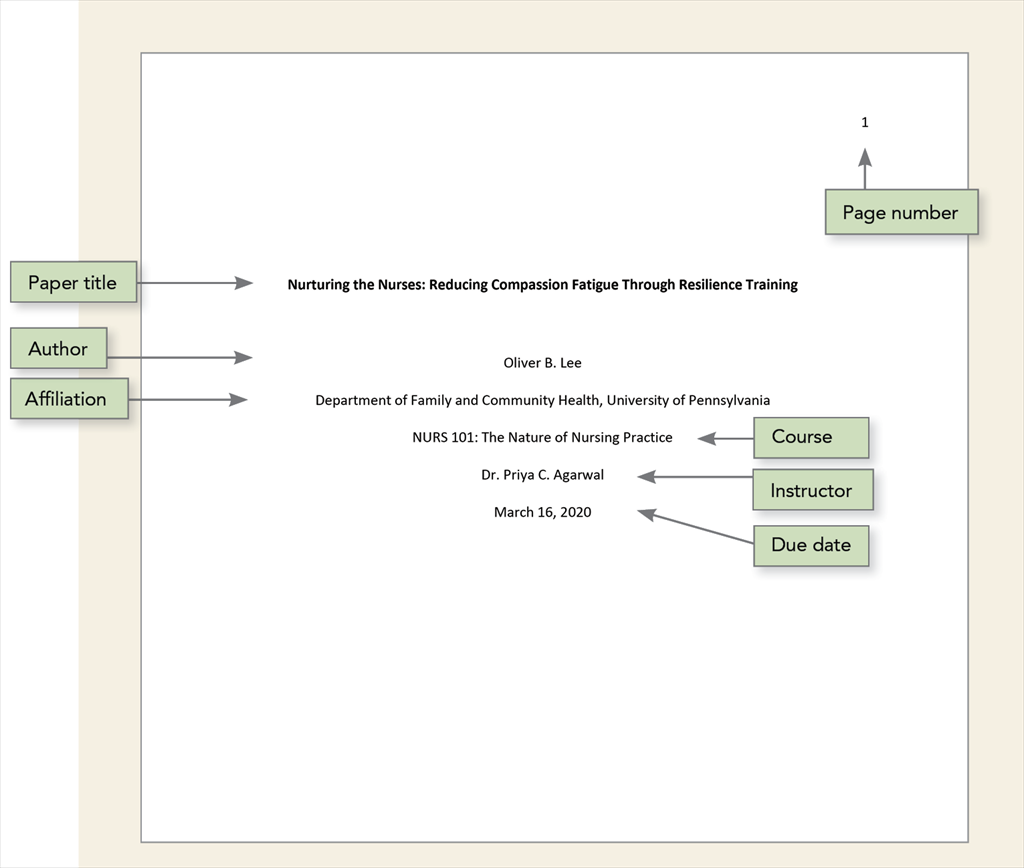
Let's break down each component. At the top of the page, centered, is the paper’s title. Below that, centered, is your name and affiliation. Student papers include the course number and name, instructor’s name, and the due date, also centered. Finally, the page number appears in the upper right-hand corner, and a running head (a shortened version of the title) is included, though its format differs between professional and student papers. We’ll cover each element in detail in the following sections.
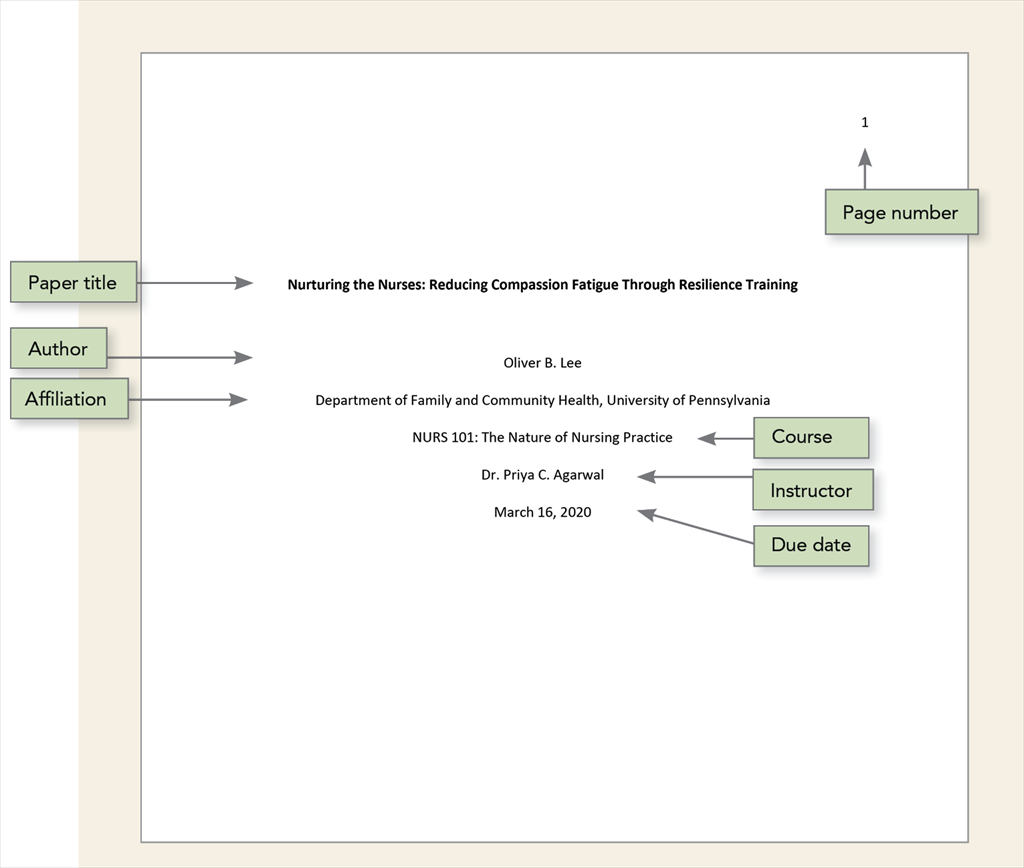
Your paper’s title is the first thing a reader will encounter, so it needs to be both accurate and engaging. Generally, the APA recommends keeping titles under 12 words. This forces you to be concise and focus on the most important aspects of your research. Avoid using abbreviations unless they are incredibly well-known within your field – for example, "DNA" is acceptable, but avoid obscure acronyms.
The best titles include keywords that accurately reflect the paper’s content. This helps readers quickly determine if the paper is relevant to their interests, and it also aids in indexing and searchability. For example, a study on the effects of mindfulness on anxiety might have a title like "Mindfulness-Based Interventions and Anxiety Reduction in College Students."
What you don’t want is a title that’s overly creative or misleading. Avoid phrases like "A Study Of…" or questions that don't clearly indicate the paper's topic. A title like 'The Enigma of the Human Mind' is too vague and doesn’t offer any specific information about the research. The title should be a clear and direct representation of your work.
Formatting your name and affiliation correctly is surprisingly important. Use the format: First Name, Middle Initial(s), Last Name. For example, "John A. Smith." If you have multiple middle names, you can include all initials or just the most relevant one. The American Psychological Association emphasizes clarity and consistency in author presentation.
The affiliation is the institution where the research was conducted – typically a university or college. Include the full name of the institution. If you’re a student, this is the university you’re attending. If you’ve conducted research at multiple institutions, list them in order of contribution, separated by commas. For example: "University of California, Berkeley; Stanford University."
When you have multiple authors, list them in order of contribution, with the primary author listed first. Each author’s name should be formatted as described above. Affiliations are typically indicated with superscript numbers, connecting each author to their respective institution. This can get complex quickly, so double-checking the APA Style manual is always a good idea.
This section is primarily for student papers. Below your affiliation, include the course number and name, followed by the instructor’s name. For example: "PSYC 101: Introduction to Psychology, Dr. Jane Doe.’ The due date is also included, typically formatted as ‘Due Date: Month Day, Year."
Instructors may have specific preferences for how this information is presented. Some might prefer the course name before the number, while others might want the due date on a separate line. It’s always best to clarify with your instructor if you’re unsure about their preferred format. A safe bet is the format described above.
If your instructor doesn’t require all of these elements, omit them. However, always include your name and affiliation. Some instructors may only ask for the course number and name, while others may not require any course information at all on the title page.
The page number should be placed in the upper right-hand corner of every page, including the title page. It’s a simple but crucial detail that ensures your paper is properly organized. The APA Style manual specifies a consistent page numbering format throughout the document.
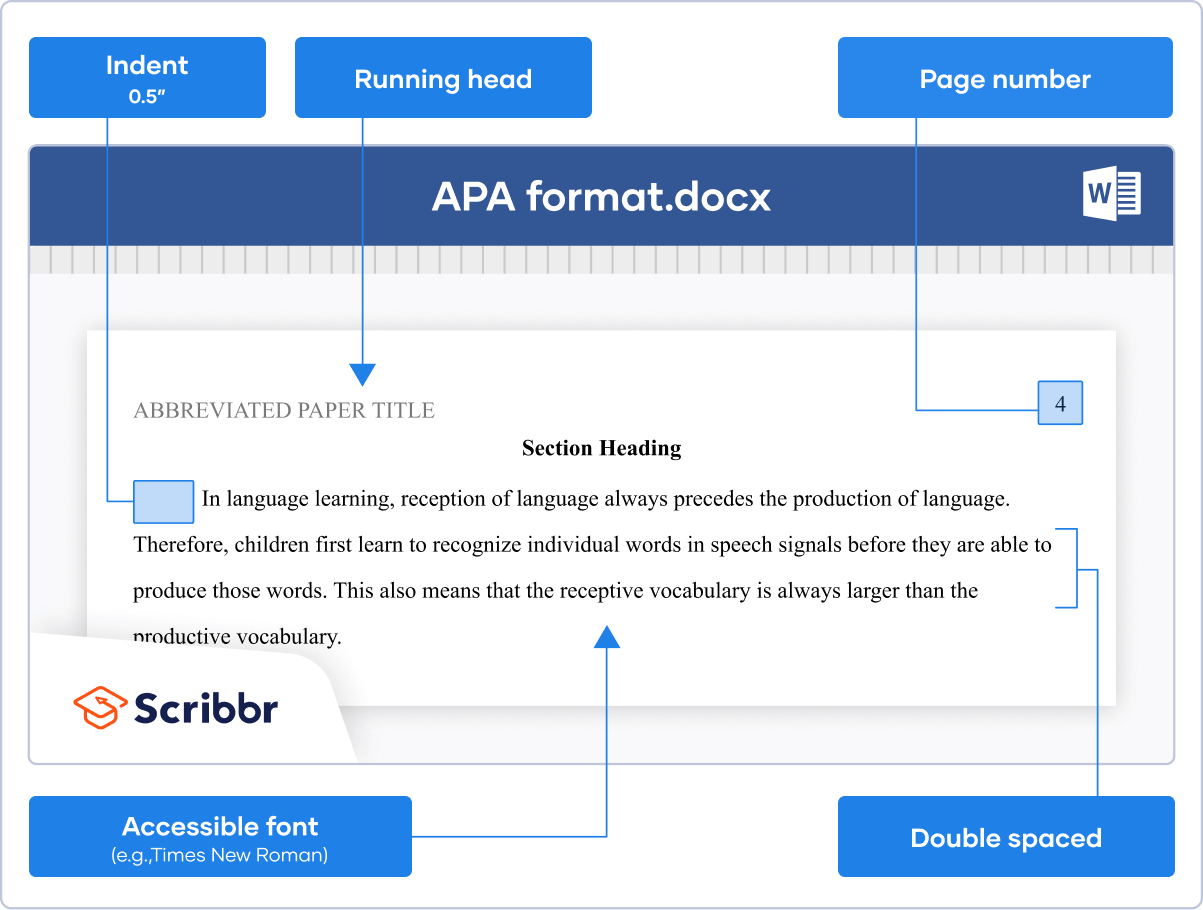
The running head is a shortened version of your paper’s title, limited to 50 characters (including spaces). For professional papers submitted for publication, the running head is in all capital letters and is left-aligned in the header. Student papers, however, do not require a running head according to the 7th edition guidelines. This was a significant simplification.
It’s unlikely the 2026 updates will reintroduce the running head for student papers, as this change was intended to reduce workload and potential errors. However, always confirm the latest guidelines when they become available. Keep in mind that professional papers will still require the all-caps running head in the upper left corner.
Consistency in formatting is key to a professional-looking APA paper. The standard font is Times New Roman, 12-point size. While other fonts are technically acceptable (like Arial or Calibri), Times New Roman is the most widely accepted and recommended choice. Using a different font can sometimes lead to points being deducted.
The entire paper, including the title page, should be double-spaced. This includes the title, author information, and any other text on the page. Double-spacing improves readability and allows space for instructors to provide feedback. Most word processors have a default double-spacing option.
Margins should be 1 inch on all sides – top, bottom, left, and right. This provides sufficient white space and ensures the text doesn't appear cramped. Most word processors also have default 1-inch margin settings. If you have a documented need for different formatting (e.g., due to a disability), your institution should provide accommodations.
- Font: Times New Roman, 12pt
- Spacing: Double-spaced
- Margins: 1 inch on all sides
The primary difference between a professional and student title page lies in the inclusion of the running head. As mentioned earlier, professional papers require a running head in all capital letters, left-aligned in the header, while student papers do not. This is the most significant distinction to keep in mind.
Professional title pages also often include a copyright notice and author note, providing additional information about the research and the author’s affiliations. These elements are not typically required for student papers. The length and detail of the title can also vary, with professional titles often being more concise and focused.
To determine which version you need, consider the purpose of your paper. If you’re submitting it for publication in a peer-reviewed journal, you’ll need a professional title page. If you’re writing it for a course assignment, you’ll need a student title page. When in doubt, always check with your instructor or the journal’s submission guidelines.
One of the most frequent errors is incorrect page number placement. Remember, it goes in the upper right-hand corner of every page, not just the title page. Another common mistake is improper author formatting – forgetting middle initials or using incorrect capitalization. Always double-check the format: First Name, Middle Initial(s), Last Name.
Missing elements are also a frequent issue. Ensure you’ve included all the required information, such as the course number, instructor’s name, and due date (for student papers). Forgetting to double-space the entire page is another common oversight. These seemingly small errors can detract from the overall professionalism of your work.
If you’re struggling with APA formatting, the Purdue OWL (Online Writing Lab) is an invaluable resource. You can find detailed guidelines and examples on their website: It’s a great place to clarify any doubts and ensure your title page is formatted correctly.
- Incorrect page number placement
- Improper author formatting
- Missing elements (course info, instructor name)
- Forgetting to double-space

No comments yet. Be the first to share your thoughts!