

Set up page margins and font
Before you type the first word of your title, configure the document settings to match APA standards. Most word processors default to different spacing and font sizes, so correcting these first prevents formatting errors later. This section covers the two foundational elements: 1-inch margins and 12-point Times New Roman font.
Adjust the margins
Open the Layout (or Page Layout) tab in your word processor and select Margins. Choose the Normal preset, which sets 1-inch margins on all sides. If your document has already been edited, ensure that no custom margins have been applied. The APA manual requires uniform 1-inch margins for the title page, just as it does for the rest of the paper. This creates a clean border around your content without wasting space.
Set the font
Highlight all text in your document (Ctrl+A or Cmd+A) and change the font to Times New Roman at 12-point size. This is the standard serif font for APA papers. If you are using a different default font, this step ensures consistency across the entire document, including the title page. While some styles allow alternatives like Arial or Calibri, Times New Roman remains the safest and most widely accepted choice for academic submissions.
Double-check spacing
Although line spacing is technically a separate setting, it is closely tied to the initial setup. Ensure your document is set to double-spacing throughout. This applies to the title page and all subsequent pages. Double-spacing improves readability and leaves room for instructor comments. Verify that your paragraph settings do not add extra space before or after paragraphs, as APA requires continuous double-spacing without additional gaps.

Place the paper title correctly
Positioning the title sets the visual anchor for your entire document. In APA 7th edition format, the title sits in the upper half of the page, acting as the first clear signal of your work's focus. Getting the vertical placement and font weight right ensures your title page meets professional standards immediately.
Center and space the title
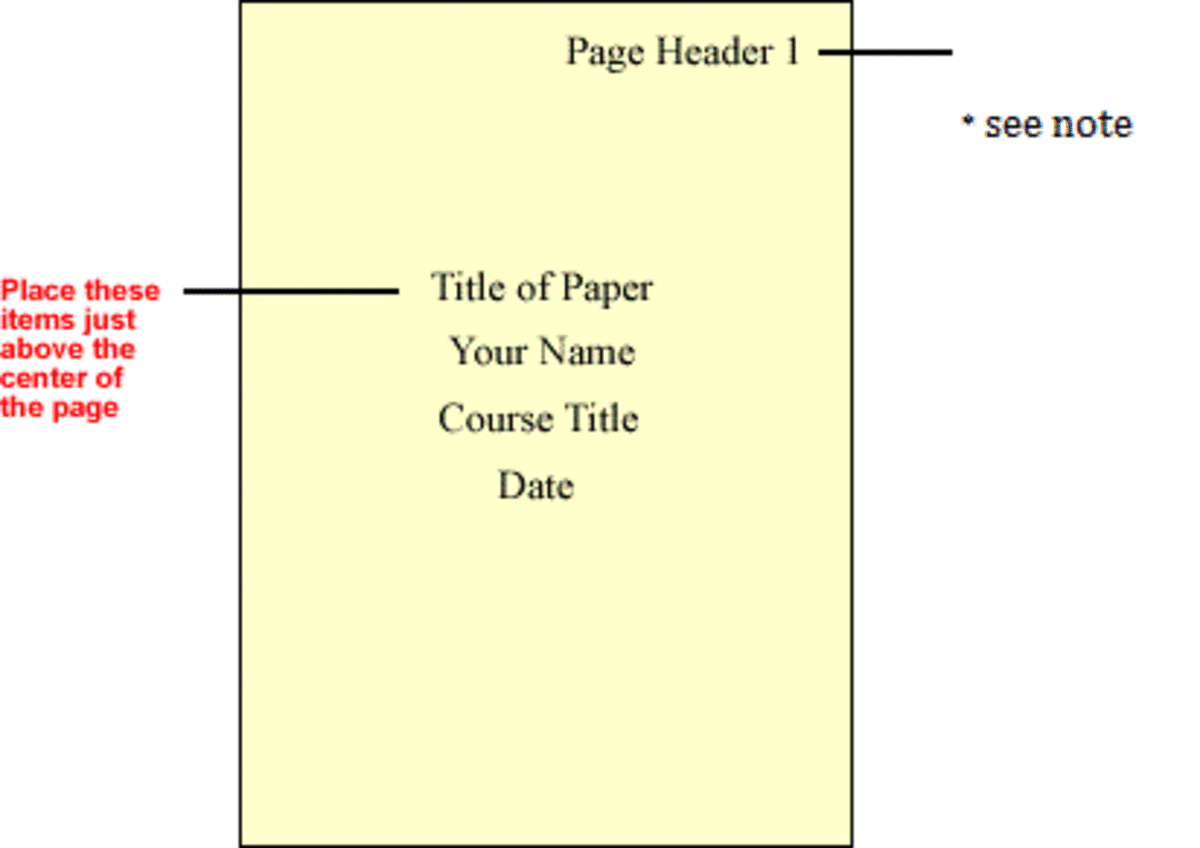
Start by double-spacing your text throughout the page. The title should appear three to four lines down from the top edge of the page. This spacing creates a balanced gap between the header area and the main content, preventing the page from feeling cramped or top-heavy.
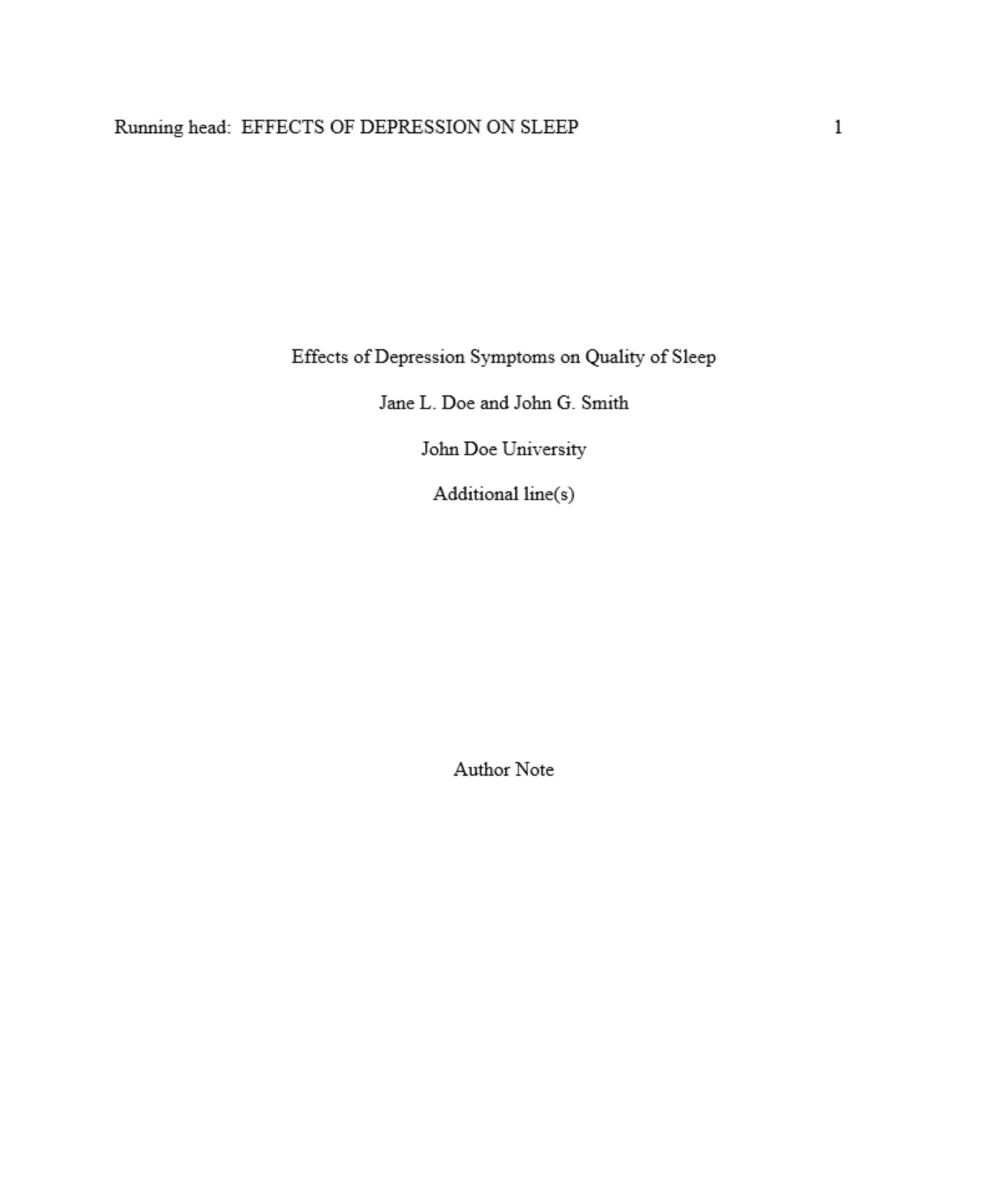
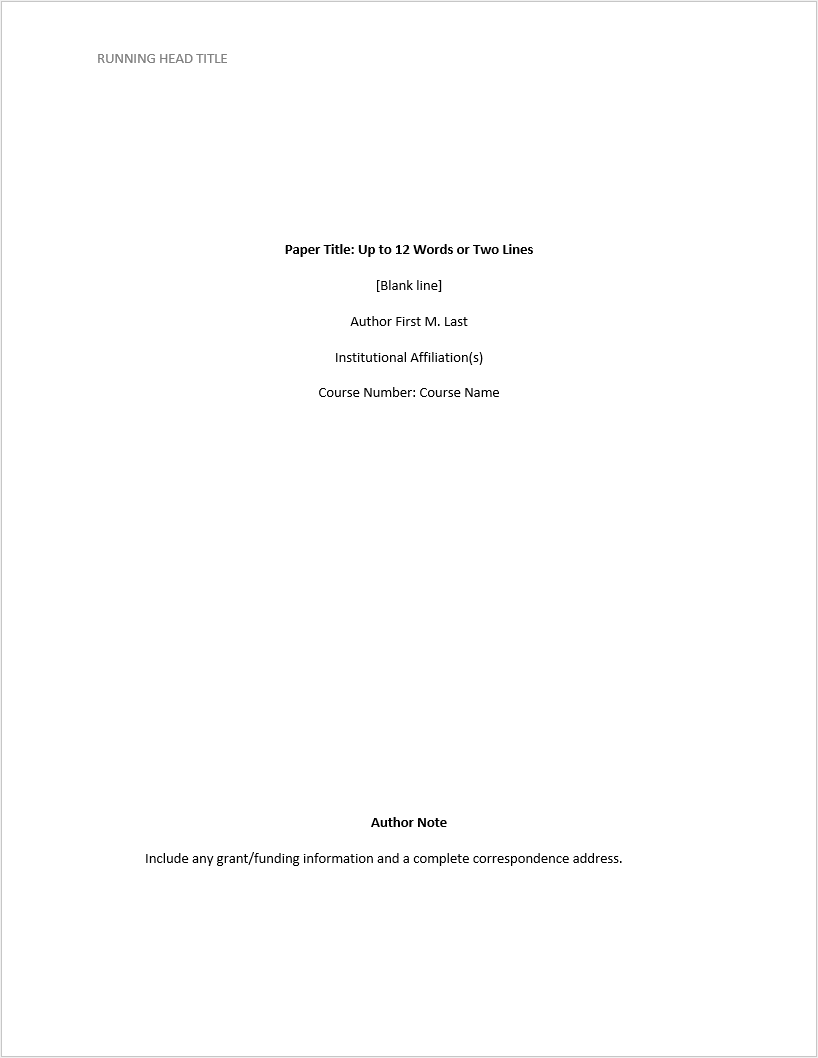
Press Enter two or three times after the page number to position the title three to four lines down from the top margin. Ensure the text is centered horizontally on the page. This vertical gap is critical for maintaining the clean, open look required by APA style guidelines.
Highlight your title text and apply bold formatting. The title must stand out visually from the author name and affiliation below it. Do not use italics, underlines, or quotation marks. The bold weight signals importance without needing decorative elements.
Capitalize only the first letter of major words. Do not capitalize articles (a, an, the), coordinating conjunctions (and, but, or), or prepositions (in, on, at) unless they are the first or last word of the title. This "title case" rule keeps the title readable and consistent with academic publishing standards.
Once formatted, verify that the title remains double-spaced and centered. A common mistake is single-spacing the title or left-aligning it, which breaks the symmetry of the page. Keep the title concise—ideally under 12 words—to ensure it fits comfortably within the upper half of the page without crowding the elements below.
Add author and affiliation details
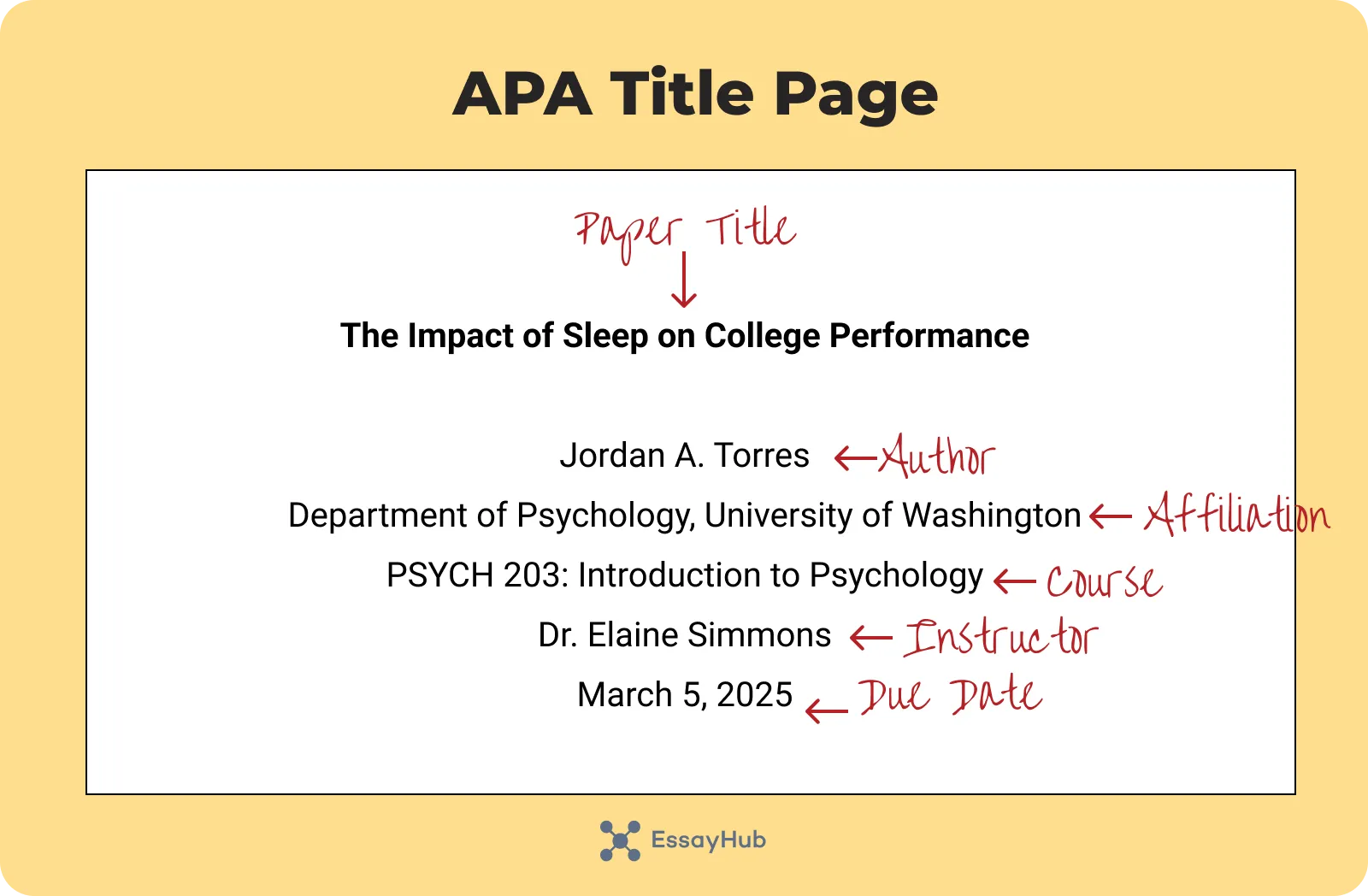
The second block of text on your APA format title page identifies who wrote the paper and where it belongs. This section follows the centered paper title. You will enter your name, your institution, the course information, the instructor’s name, and the due date.
Type your full name exactly as it appears in official records. Do not include titles (Dr., Mr.) or degrees (PhD, RN). Place this text on the line immediately below the paper title. Center the name horizontally on the page.
On the next line, enter the name of your university or institution. For example, "University of Washington." Center this line directly below your name. If you have multiple affiliations, list them in the order you contributed to the work.
Type the course number and the full course name on the following line. For instance, "PSYC 101: Introduction to Psychology." Center this text. This line helps the instructor identify the specific class for which the paper is intended.

On the next line, type the full name of your instructor. Include their title if required by your department, such as "Professor" or "Dr." Center this line below the course information. This identifies who will grade the assignment.
On the final line of this block, type the due date in Month Day, Year format. For example, "12 May 2026." Center this line. Do not use abbreviations for the month or commas between the day and year.
Ensure there is no extra spacing between these lines. The entire block should be vertically centered on the page, starting approximately three lines down from the top margin.
Insert page number in header
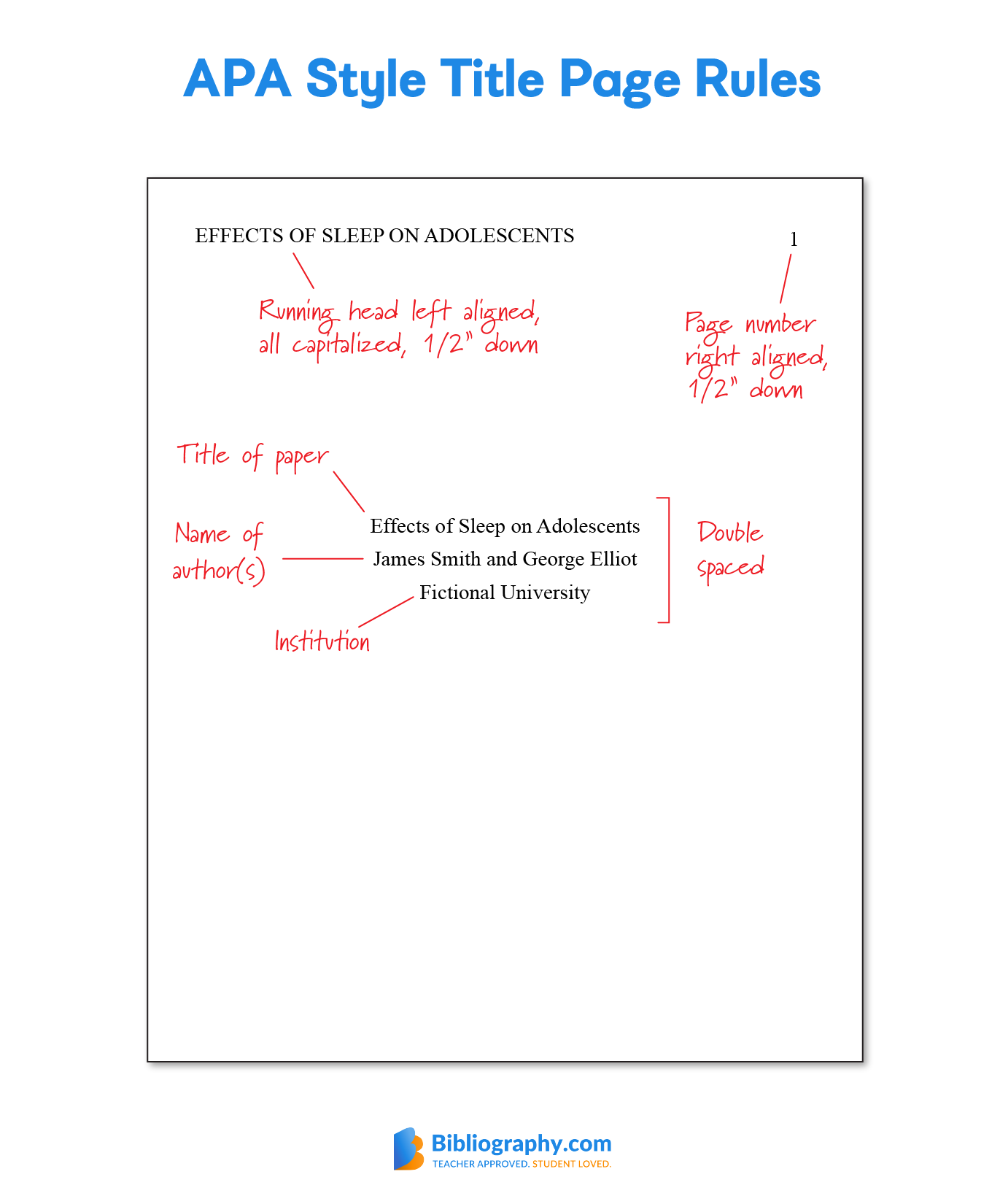
The page number sits in the top right corner of the header, flush against the right margin. This placement applies to every page of the paper, including the title page. For the title page, the number starts at 1.
Most word processors place the header in the top margin area. You need to align the text to the right side. Do not use the spacebar to push the number over; this breaks alignment when fonts or margins shift.
- Double-click the top margin area to open the header.
- Type the page number.
- Click the "Align Right" button in the toolbar.
The header should be 0.5 inches from the top edge. The number should be in the same font as the rest of the text, typically Times New Roman 12-point.
Handle AI-generated source citations
Citing AI tools requires a shift from traditional authorship to process transparency. In 2026, academic integrity guidelines emphasize disclosing when generative models assist in research or drafting. This ensures readers understand the origin of ideas and text.
Treat AI as a collaborative tool rather than a primary source. When an AI generates significant content, cite the specific platform and version used. This practice maintains the credibility of your APA format title page and subsequent references.
Follow these steps to integrate AI citations correctly:

Locate the exact version of the tool you used (e.g., ChatGPT-4, Claude 3). Version numbers matter because outputs differ between updates. Record the date of access for accuracy.
If you used AI to generate data or unique insights, cite it as a primary source. If you used it for editing or brainstorming, acknowledge it in the text without a full reference entry, depending on your institution’s specific policy.
Use the standard APA structure for digital content. List the organization, the year, the title of the work (if applicable), and the URL. Ensure the format matches the 7th edition guidelines for electronic sources.
By adhering to these steps, you protect your academic standing. Clear citation of AI assistance demonstrates rigor and respect for intellectual property norms.
Final proofing checklist
Before you submit your paper, treat the title page as a distinct entity that must stand on its own. The American Psychological Association requires specific formatting details that are easy to miss during a quick review. Use this checklist to verify every element is present and correctly positioned.
Ensure the title is positioned three to four lines down from the top margin. This vertical placement distinguishes the title page from the rest of the manuscript and meets APA 7th edition standards.

The paper title must be bolded and centered. It should appear on its own line, followed by a single blank line before the author’s name. Avoid underlining or using title case for the entire title unless proper nouns require it.
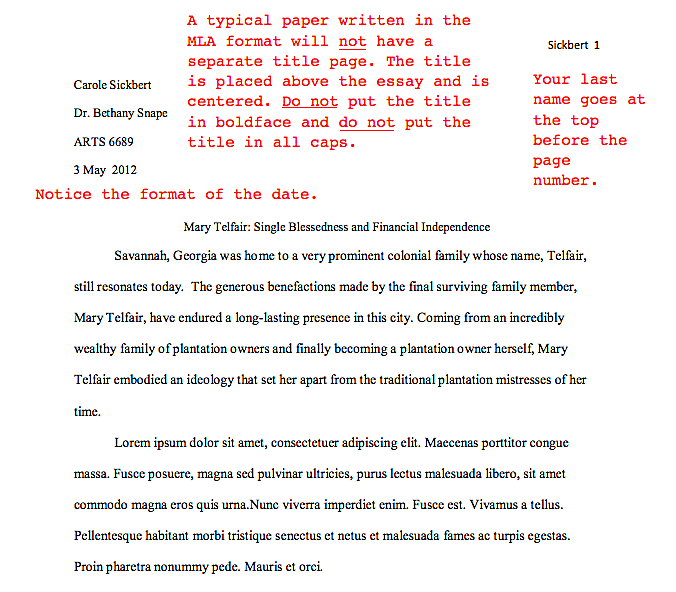
:max_bytes(150000):strip_icc()/telfair-turabian2-58b986073df78c353cdf3341.PNG)
List your full name (first name, middle initial, last name) on the line immediately following the title. Below your name, include your department and university. Ensure all text is double-spaced throughout the page.
For student papers, include the course number and name on the next line, followed by the instructor’s name. Finally, add the assignment due date in Month Day, Year format. Review the date for accuracy to avoid administrative delays.
Common title page errors to avoid
Even with the right tools, small formatting slips can ruin an APA title page. The most frequent mistakes involve alignment, bolding, and spacing. Fixing them requires a quick scan against the official checklist.
Most errors start with left-aligned text. APA requires all title page elements—title, author, and affiliation—to be centered horizontally. Use the center alignment tool in your word processor. Ensure the vertical position starts about three to four lines down from the top margin.

Only the paper title should be bolded. The author name and institutional affiliation remain in regular font. Do not italicize the title or use all caps unless your specific instructor requests it. Keep the title concise and place it on its own line.
Double-check that you are using double spacing throughout the entire page. Single spacing between the title and author name is a common error. Ensure the top margin is exactly one inch. Use the "double space" function rather than pressing Enter repeatedly to create gaps.
A clean title page signals attention to detail. If you are unsure, compare your draft against a verified APA 7th edition example.
Frequently asked: what to check next
What goes on an APA 7 title page?
An APA 7 title page requires six specific elements, each on its own line: the paper title (bolded), your name, department and university, course number and name, instructor name, and the due date. A page number (1) appears in the top right corner. Keep everything centered and double-spaced with 1-inch margins.
Do I need a running head on my student paper?
No. Student papers do not require a running head unless your instructor or institution specifically asks for one. Professional papers still require it, but for most college assignments, you can skip this element entirely.
How do I center text in APA format?
Use the center alignment tool in your word processor. Do not use spaces or tabs to push text to the middle. Ensure the entire block of title page information is centered horizontally on the page, starting about three inches from the top.
No comments yet. Be the first to share your thoughts!