

Set up page margins and font
Before typing a single word of your title, configure your document’s canvas. APA 7 style requires a clean, standardized layout that prioritizes readability. Start by opening a new blank document in your word processor.
Navigate to the Layout or Page Setup menu. Set all four margins—top, bottom, left, and right—to exactly 1 inch. This uniform spacing creates the necessary white space around your content, ensuring the page doesn't look cramped. If you are using Google Docs, find this under File > Page setup. For Microsoft Word, look for Margins in the Layout ribbon.
Next, select your typeface. APA 7 permits several fonts, but 12-point Times New Roman remains the standard choice for most college essays. It is widely available and highly legible. You can also use 11-point Calibri, 11-point Arial, or 10-point Lucida Sans Unicode if your instructor allows, but Times New Roman is the safest bet for consistency.

With your margins and font set, your document is ready for the title page content. This foundation ensures that when you add your title, author name, and affiliation, the formatting will align perfectly with APA guidelines.
Add the running head and page number
Configure the header area of your document to include the running head and page number. This element appears in the top right corner of every page, including the title page itself. The setup differs slightly depending on whether you are writing a student paper or a professional manuscript.
Student papers: page number only
For most college essays, APA 7 requires only the page number in the header. Type the number in the top right corner, aligned with the 1-inch margin. Use the same font and size as the rest of your text (usually Times New Roman 12pt). Do not include the words "Running head:" or the paper title in the header.
Note: Student papers in APA 7 do not require the words 'Running head:' before the title, only the title itself in all caps.
Professional papers: full running head
If you are submitting a paper for publication or professional review, you must include the full running head. Type "RUNNING HEAD:" in all caps, followed by a space and the paper title (also in all caps, max 50 characters). Place this in the top left corner. On subsequent pages, only the title itself (no "RUNNING HEAD:" prefix) appears in the top left, while the page number remains in the top right.
Setting up headers in Word
In Microsoft Word, double-click the top margin of any page to open the Header area. Insert the page number using the "Page Number" tool, selecting "Top of Page" and "Plain Number 3" for right alignment. For professional papers, type the running head text in the left header box. Ensure "Different First Page" is unchecked so the title page matches the rest of the document.
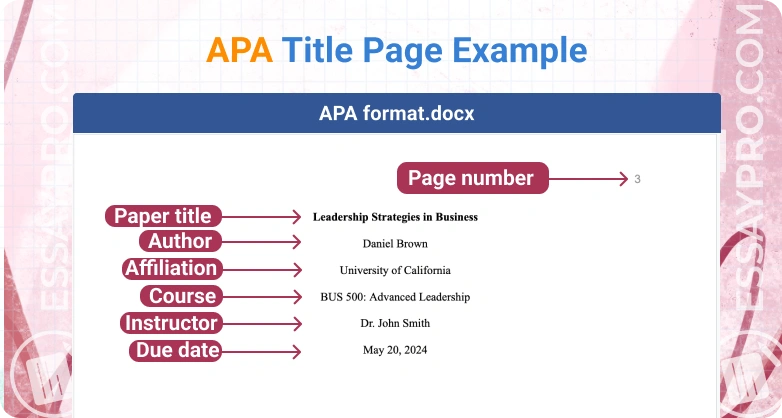
Place the title, author, and institution
The top half of your APA 7 title page is reserved for the core identity elements: the paper title, your name, and the institution. These elements must be centered and double-spaced, creating a clean, uncluttered look. Do not add extra blank lines between them, and do not include your student ID number or section.
Position the title
Start by placing the title three to four lines down from the top of the page. This vertical spacing ensures the title sits in the upper half of the document without crowding the header. Type the title in bold, using title case to capitalize major words. Keep the font consistent with the rest of your paper, typically 12-point Times New Roman or 11-point Arial.

Press Enter three or four times from the top margin. Type your paper title in bold. Ensure the text is centered horizontally. Do not use underlining, italics, or quotation marks around the title.
Press Enter twice (to create one blank line) after the title. Type your full name, then press Enter once. Type your department and university name, then press Enter once. Finally, type the course number and name, followed by the instructor's name and the due date on separate lines.
Verify the hierarchy
The visual hierarchy should flow naturally from the title down to the date. Each element sits directly beneath the previous one with only a single double-spaced line between them. This creates a unified block of text that anchors the page. Avoid adding subtitles or descriptive phrases unless they are part of the official title. The goal is clarity and adherence to the standard format, making it easy for instructors to identify your work immediately.
Format the title text correctly
Your essay title is the most prominent text on the page. It must sit in the upper half of the title page, centered horizontally and vertically aligned with the other required elements. Unlike the page header or author name, the title itself requires specific typographic treatment to signal its importance without cluttering the page.
First, apply bold formatting to the entire title. This distinguishes it from the author byline and affiliation that follow below. The bold text should be clear and legible, using the same font family as the rest of the paper—typically Times New Roman 12-point or Arial 11-point. Do not use italics, underlining, or quotation marks around the title.
Next, apply title case capitalization. Capitalize the first letter of the first word, the first word of a subtitle if present, and all major words in between. Leave lowercase the minor words such as articles ("a," "an," "the"), coordinating conjunctions ("and," "but," "or"), and short prepositions ("in," "on," "at") unless they start the title. This rule ensures a professional, standardized appearance.
If your title is long enough to require two or more lines, center each line independently. Do not left-align the second line with the first word of the first line. Maintain equal spacing between the lines of the title, matching the double-spacing used throughout the rest of the document.
Check your work against the checklist
Before submitting your college essay, treat the title page like a final proofread. A single formatting error can distract your professor or confuse automated grading systems. Use the steps below to verify that every required element is present and correctly placed.
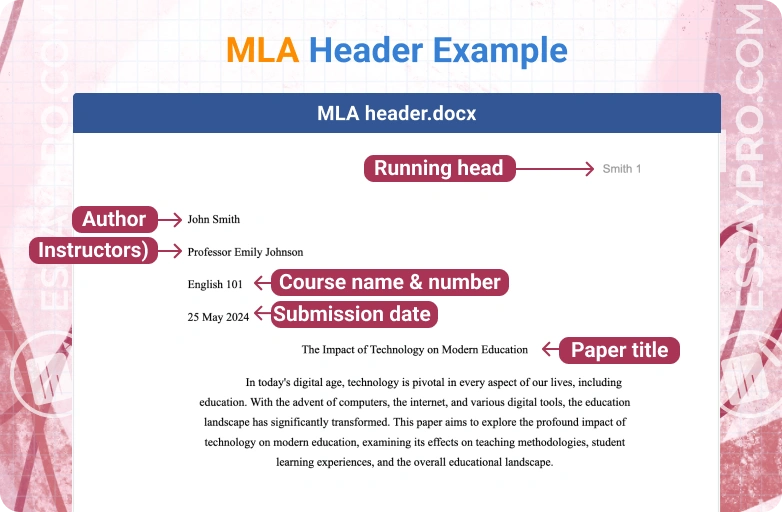
For student papers, the running head is no longer required. Ensure only the page number appears in the top right corner, flush right and half an inch from the top. It should be on every page, including the title page.
The title must be centered and bold, positioned three to four lines down from the top. Use title case, capitalizing major words. Avoid abbreviations, footnotes, or decorative fonts. The title should be in the upper half of the page, not centered vertically.
Your full name and the institution (e.g., University Name) should appear directly beneath the title, centered and double-spaced. Do not include your student ID, course number, or instructor’s name here unless specifically requested by your professor.
The course number and name, along with the assignment due date, should be centered in the lower half of the page. Use the format: Course Number: Course Name. For the date, write it in the format: Month Day, Year (e.g., October 12, 2023).
If your paper deviates from these standards, correct it now. A clean title page signals attention to detail before the reader even sees your thesis.
Common apa title page: what to check next
Students often hit roadblocks when formatting their first APA 7 title page. These answers address the most frequent points of confusion, from margin settings to header placement, so you can get the layout right the first time.
What is the correct APA format for a title page?
An APA 7 title page requires six specific elements, each on its own line: the paper title, author name, department, university, course number and name, instructor name, and assignment due date. The entire page must use 1-inch margins on all sides and be double-spaced. There should be no extra blank lines between these elements, and the text should start approximately three to four lines down from the top edge of the page.
What do headers look like in APA format?
The header, known as the "page number" or "running head," appears in the top right corner of every page, including the title page. It consists solely of the page number (e.g., "1"). Unlike APA 6, APA 7 no longer requires the words "Running head:" followed by the title in all caps. Just the number is needed.
How to make a perfect title page?
To ensure precision, use the "Insert > Page Number" feature in your word processor rather than typing the number manually. This keeps the header consistent across all pages. Center all title page content horizontally. Use Title Case for the paper title (capitalize major words) and keep the author and course information in standard sentence case. Avoid bolding the author or course details; only the paper title itself should be bolded.
No comments yet. Be the first to share your thoughts!