

Set up the document canvas
Before drafting the substantive arguments, you must configure the page settings to match California Superior Court formatting rules. Rule 2.111 and Rule 8.74 dictate the foundational layout for all filings. If the document canvas is incorrect, the clerk may reject the filing or the court may strike the document regardless of its legal merit.
Configure Margins and Spacing
The court requires uniform margins to ensure proper binding and readability. Set all four margins—top, bottom, left, and right—to exactly one inch. Do not use narrower margins for footnotes or headers unless specifically authorized by a local court rule, which is rare for general civil filings.
Spacing must be double throughout the entire document. This includes the caption, the body text, footnotes, and quotations. Single spacing is only permitted for block quotations, footnotes, and captions that exceed a certain line count, but the default must remain double. This requirement prevents the document from appearing cramped and ensures judges can annotate the text easily.
Select an Approved Font
Rule 8.74 mandates a specific font style to maintain consistency across all court filings. You must use a font that is essentially equivalent to Courier, Times New Roman, or Arial. Courier New is the traditional standard because its monospaced nature makes line counts predictable, but Times New Roman is widely accepted for its readability.
The font size must be at least 12 points. If you use a font like Courier New, the 12-point requirement is strict. If you use a proportional font like Times New Roman, some local rules may permit 11-point text, but sticking to 12-point eliminates any risk of rejection. The text color must be black. Colored text or light gray shading is not permitted for the main body of the document.
Establish the First Page Structure
Rule 2.111 requires a specific format for the first page of each paper. The caption must appear in the upper left corner, starting one inch from the top of the page. This caption must include the court name, the case number, the title of the document, and the names of the parties.
Below the caption, you must leave space for the court’s filing stamp. Do not place any text in the top right corner unless it is a confidentiality notice, which must follow specific formatting guidelines. The rest of the first page should begin with the introductory paragraph of your document, maintaining the double-spacing and font requirements established above.
Source: Rule 8.74. Format of electronic documents and Rule 2.111. Format of first page.
Construct the first page header
California Superior Court rules require a specific layout for the first page of every filed document. Rule 2.111 dictates the exact placement of the caption and case information. Following this structure prevents your filing from being rejected or returned for correction.
You will build this page using a vertical sequence of aligned text blocks. The caption sits at the top, followed by the case number and title details. Each element has a precise margin requirement.
Set the caption block
The caption begins in the upper left quadrant of the page. Start line 1 exactly 1 inch from the top edge. This line contains the court name and the county.
On line 2, list the plaintiff’s name. On line 3, list the defendant’s name. Use the full legal names as they appear in the complaint or petition. Align all three lines to the left margin.
Add the case details
Below the party names, you must include the case number and title. This section typically appears on lines 4 and 5.
- Line 4: Enter the case number (e.g., BC2312345).
- Line 5: Enter the title of the document (e.g., COMPLAINT FOR DAMAGES).
Ensure there is a clear break between the party names and the case title. This separation helps the clerk quickly identify the document type and docket number.
Verify alignment and spacing
Double-check that all text in the header block is left-aligned. Do not center the caption. The court requires strict adherence to the left margin for the first five lines.
If you are filing electronically, ensure your PDF does not add extra whitespace at the top of the page. The digital file must mirror the physical margin requirements.

Begin line 1 exactly 1 inch from the top of the page. Type the name of the court (e.g., SUPERIOR COURT OF CALIFORNIA) and the county in which you are filing. Align this text to the left margin.
On line 2, type the name of the plaintiff. On line 3, type the name of the defendant. Use the exact legal names. Keep these lines left-aligned directly below the court name.
On line 4, enter the case number assigned by the court. On line 5, type the title of your document (e.g., MOTION TO COMPEL). This completes the mandatory caption block required by Rule 2.111.
Format body text and citations
Proper formatting ensures your filing meets the California Rules of Court. Courts reject documents that do not follow specific line numbering and citation standards. Follow these steps to prepare your body text correctly.
Add line numbers
Every page of your document must have line numbers. This helps judges reference specific text during hearings. Number every fifth line, starting from the first line of text. Do not number blank lines or headers. Use a consistent font size, typically 12-point or 14-point, to ensure the lines are visible and legible. This requirement applies to all pleadings and motions filed in superior court.
Structure footnotes correctly
Use footnotes for citations and additional commentary. Place footnotes at the bottom of the page. Keep them concise. If a footnote spans multiple pages, continue the numbering sequentially. Do not use endnotes. Ensure the footnote text is clearly separated from the main body by a horizontal line or sufficient spacing. This structure allows the reader to distinguish between your argument and the supporting legal authority.
Apply citation styles
Cite all legal authorities using the California Style Manual. Use Bluebook rules for federal cases or statutes not covered by the state manual. Always include the full case name, volume, reporter, page number, and year. For example: Smith v. Jones, 123 Cal. App. 4th 456 (2005). If you cite a statute, provide the code section and the relevant year. Incorrect citations can lead to your document being stricken or delayed. Double-check every reference against the official source.
Verify compliance
Before filing, review your document against the California Rules of Court. Ensure all line numbers are present and accurate. Check that every citation follows the required format. Use the Judicial Council’s formatting guidelines as a checklist. Proper formatting is not just a technicality; it demonstrates professionalism and respect for the court's procedures. A well-formatted document is more likely to be read and considered on its merits.
Prepare for electronic filing
The transition from paper to digital filing in California Superior Courts requires strict adherence to technical specifications. Courts reject documents that do not meet specific format standards, so verifying your file before submission is essential. The primary requirement is that all electronic documents must be in text-searchable portable document format (PDF) while maintaining the original document formatting [src-serp-1].
Ensure text searchability
A text-searchable PDF allows the court clerk and opposing counsel to use the "Find" function to locate specific words or phrases within the document. This is distinct from a scanned image PDF, which is essentially a picture of text and cannot be searched. If you scan a paper document, you must use OCR (Optical Character Recognition) software to make the text selectable. Non-searchable PDFs may be rejected by the court clerk, causing delays in your case.
Verify formatting and bookmarks
Beyond the file format, the internal structure of your PDF matters. Ensure that your document includes bookmarks for easy navigation, especially for lengthy briefs or appendices. Basic formatting requirements include a font size of at least 12 points and a style equivalent to Courier, Times New Roman, or Arial [src-serp-2].
Before uploading, open your file and test the search function. Type a unique phrase from your document to confirm it is indexed correctly. This simple step prevents the most common filing errors and ensures your submission is accepted on the first attempt.
Run a final compliance check
Before you file, verify that your document meets California Superior Court formatting rules. This pre-submission check prevents rejections based on font, spacing, or margin errors.
Confirm your document uses a standard serif or sans-serif font like Times New Roman, Arial, or Courier. The size must be at least 12 points. This ensures readability for judges and clerks.
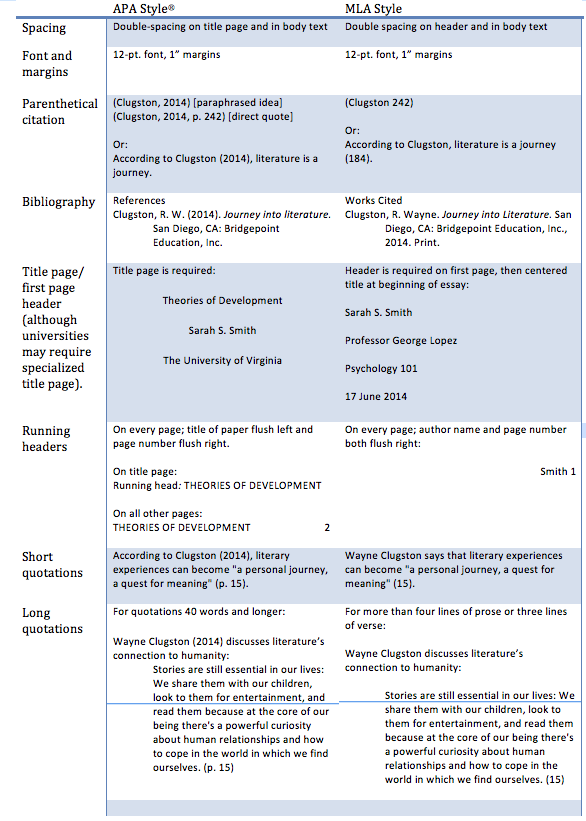
Ensure one-inch margins on all sides. Use double spacing for the main text, with single spacing for block quotes and footnotes. Consistent spacing prevents layout shifts during electronic filing.

Every page must have a page number in the footer. The first page must include the full case caption, court name, and case number. Missing captions are a common cause of rejection.
Export your final document as a PDF. Ensure text is selectable, not just an image scan. Run a quick scroll through to confirm no formatting breaks occurred during export.
Use this checklist to ensure all formatting rules are met before filing.
-
Font is 12pt or larger
-
Margins are one inch on all sides
-
Text is double-spaced
-
Page numbers are visible
-
PDF is text-searchable
If your document fails any of these checks, correct it immediately. A rejected filing delays your case and may incur additional fees.
Common formatting mistakes to avoid
Even minor deviations from California Superior Court formatting rules can trigger document rejection or sanctions. The court’s primary concern is consistency and readability, not aesthetics. When judges and clerks cannot easily scan your filings, errors compound quickly.
Margins and spacing violations
California Rules of Court require one-inch margins on all sides. Many filers accidentally set narrower margins to fit more text on a page. This small change often leads to truncation during scanning or binding. Always verify page layout settings before printing.
Font size and type errors
The standard font size is 14-point for regular text and 12-point for footnotes. Using smaller fonts to squeeze in extra arguments is a frequent mistake. Stick to approved typefaces like Times New Roman or Courier. Deviating from these standards can result in your document being returned without review.
Incorrect page numbering
Page numbers must appear in the bottom right corner, half an inch from the bottom and right edges. Placing them in the header or using inconsistent formats disrupts the court’s filing system. Ensure every page, including exhibits, follows this sequence. A missing page number on a critical exhibit can delay proceedings significantly.
Improper binding
Documents must be bound on the left side using staples or a comb binding. Loose-leaf pages or right-side binding are not accepted. Courts use automated sorting machines that cannot handle non-standard bindings. Always double-check your binding method before submission to avoid costly rework.

No comments yet. Be the first to share your thoughts!